

MS-102 Exam Question 36
You have a Microsoft 365 subscription that uses Microsoft 365 Defender.
You need to compare your company's security configurations to Microsoft best practices and review improvement actions to increase the security posture.
What should you use?
You need to compare your company's security configurations to Microsoft best practices and review improvement actions to increase the security posture.
What should you use?
MS-102 Exam Question 37
You have a Microsoft 365 subscription.
You need to review reports to identify the following:
* The storage usage of files stored in Microsoft Teams
* The number of active users per team
Which report should you review for each requirement? To answer, drag the appropriate reports to the correct requirements. Each report may be used once, more than once, or not at all. You may need to drag the split bar between panes or scroll to view content

You need to review reports to identify the following:
* The storage usage of files stored in Microsoft Teams
* The number of active users per team
Which report should you review for each requirement? To answer, drag the appropriate reports to the correct requirements. Each report may be used once, more than once, or not at all. You may need to drag the split bar between panes or scroll to view content


MS-102 Exam Question 38
You have an Azure subscription and an on-premises Active Directory domain. The domain contains 50 computers that run Windows 10.
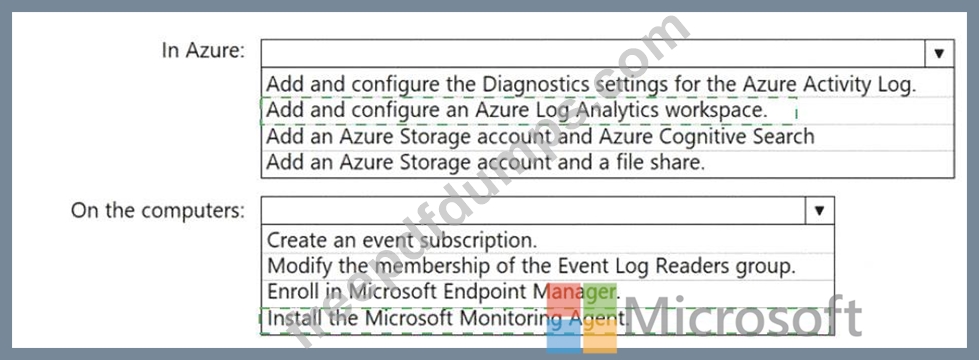
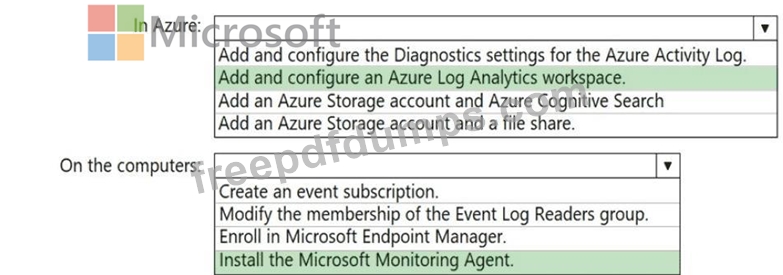
You need to centrally monitor System log events from the computers.
What should you do? To answer, select the appropriate options in the answer area.
NOTE: Each correct selection is worth one point.
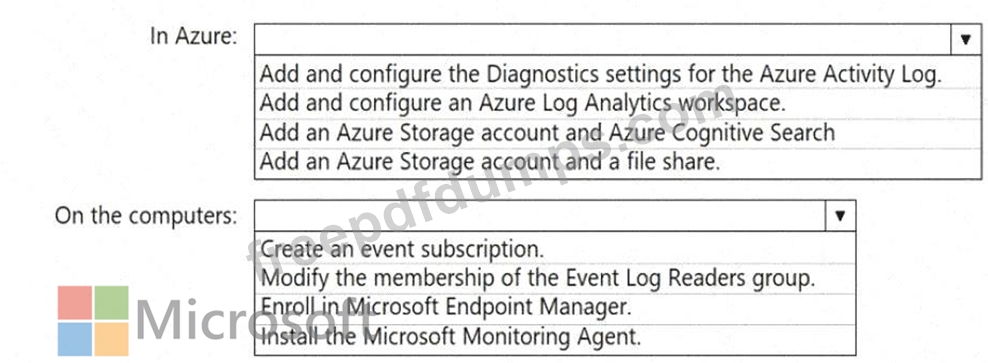
You need to centrally monitor System log events from the computers.
What should you do? To answer, select the appropriate options in the answer area.
NOTE: Each correct selection is worth one point.
MS-102 Exam Question 39
You have a Microsoft 365 E5 subscription.
Several users have iOS devices.
You plan to enroll the iOS devices in Microsoft Endpoint Manager.
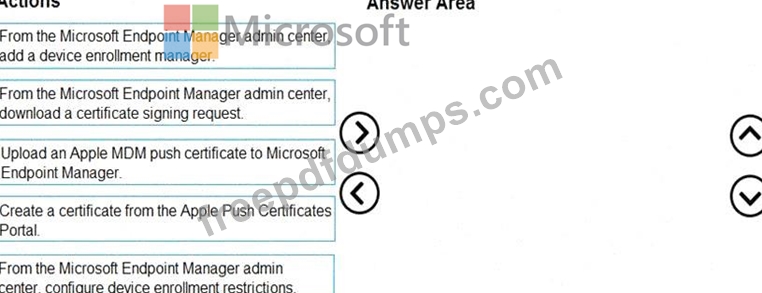
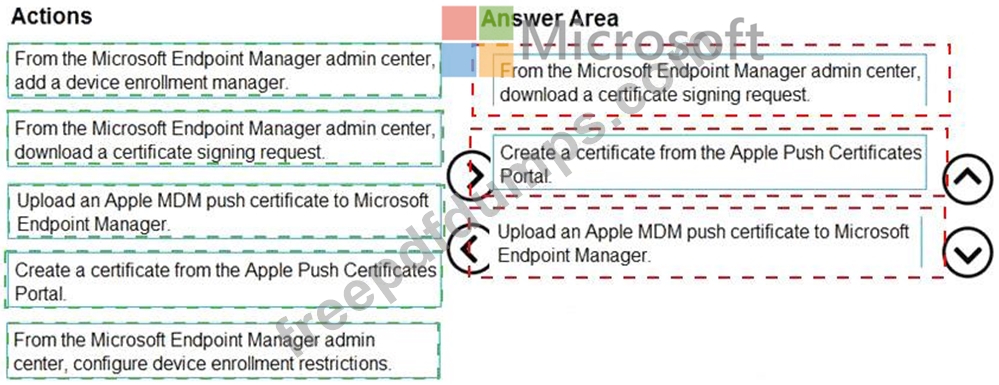
You need to ensure that you can create an iOS/iPadOS enrollment profile in Microsoft Endpoint Manager.
Which three actions should you perform in sequence? To answer, move the appropriate actions from the list of actions to the answer area and arrange them in the correct order.
Several users have iOS devices.
You plan to enroll the iOS devices in Microsoft Endpoint Manager.
You need to ensure that you can create an iOS/iPadOS enrollment profile in Microsoft Endpoint Manager.
Which three actions should you perform in sequence? To answer, move the appropriate actions from the list of actions to the answer area and arrange them in the correct order.

MS-102 Exam Question 40
Note: This question is part of a series of questions that present the same scenario. Each question in the series contains a unique solution that might meet the stated goats. Some question sets might have more than one correct solution, while others might not have a correct solution.
After you answer a question in this section, you will NOT be able to return to it. As a result, these questions will not appear in the review screen.
Your network contains an Active Directory domain.
You deploy a Microsoft Entra tenant.
Another administrator configures the domain to synchronize to the Microsoft Entra tenant.
You discover that 10 user accounts in an organizational unit (OU) are NOT synchronized to the Microsoft Entra tenant. All the other user accounts synchronized successfully.
You review Microsoft Entra Connect Health and discover that all the user account synchronizations completed successfully.
You need to ensure that the 10 user accounts are synchronized to the Microsoft Entra tenant.
Solution: From Microsoft Entra Connect, you modify the filtering settings.
Does this meet the goal?
After you answer a question in this section, you will NOT be able to return to it. As a result, these questions will not appear in the review screen.
Your network contains an Active Directory domain.
You deploy a Microsoft Entra tenant.
Another administrator configures the domain to synchronize to the Microsoft Entra tenant.
You discover that 10 user accounts in an organizational unit (OU) are NOT synchronized to the Microsoft Entra tenant. All the other user accounts synchronized successfully.
You review Microsoft Entra Connect Health and discover that all the user account synchronizations completed successfully.
You need to ensure that the 10 user accounts are synchronized to the Microsoft Entra tenant.
Solution: From Microsoft Entra Connect, you modify the filtering settings.
Does this meet the goal?