

MS-102 Exam Question 16
You need to ensure that User2 can review the audit logs. The solutions must meet the technical requirements.
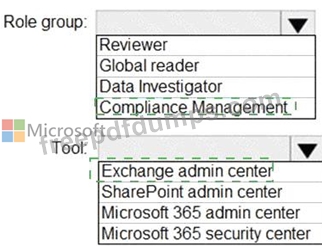
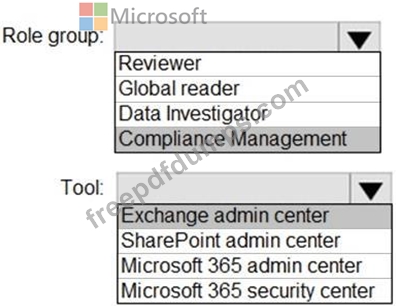
To which role group should you add User2, and what should you use? To answer, select the appropriate options in the answer area.
NOTE: Each correct selection is worth one point.
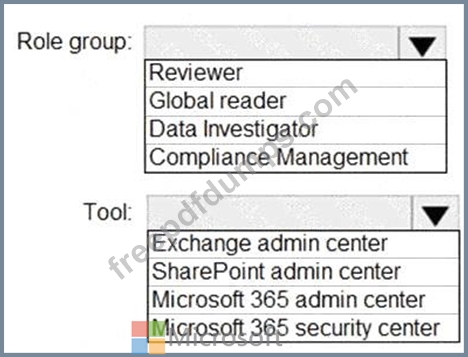
To which role group should you add User2, and what should you use? To answer, select the appropriate options in the answer area.
NOTE: Each correct selection is worth one point.
MS-102 Exam Question 17
Your on-premises network contains an Active Directory domain.
You have a Microsoft 365 subscription.
You need to sync the domain with the subscription. The solution must meet the following requirements:
* On-premises Active Directory password complexity policies must be enforced.
* Users must be able to use Microsoft Entra Self-Service Password Reset (SSPR).
What should you use?
You have a Microsoft 365 subscription.
You need to sync the domain with the subscription. The solution must meet the following requirements:
* On-premises Active Directory password complexity policies must be enforced.
* Users must be able to use Microsoft Entra Self-Service Password Reset (SSPR).
What should you use?
MS-102 Exam Question 18
Note: This question is part of a series of questions that present the same scenario. Each question in the series contains a unique solution that might meet the stated goals. Some question sets might have more than one correct solution, while others might not have a correct solution.
After you answer a question in this section, you will NOT be able to return to it. As a result, these questions will not appear in the review screen.
Your network contains an Active Directory domain named contoso.com that is synced to Microsoft Azure Active Directory (Azure AD).
You manage Windows 10 devices by using Microsoft System Center Configuration Manager (Current Branch).
You configure a pilot for co-management.
You add a new device named Device1 to the domain. You install the Configuration Manager client on Device1.
You need to ensure that you can manage Device1 by using Microsoft Intune and Configuration Manager.
Solution: You create a device configuration profile from the Device Management admin center.
Does this meet the goal?
After you answer a question in this section, you will NOT be able to return to it. As a result, these questions will not appear in the review screen.
Your network contains an Active Directory domain named contoso.com that is synced to Microsoft Azure Active Directory (Azure AD).
You manage Windows 10 devices by using Microsoft System Center Configuration Manager (Current Branch).
You configure a pilot for co-management.
You add a new device named Device1 to the domain. You install the Configuration Manager client on Device1.
You need to ensure that you can manage Device1 by using Microsoft Intune and Configuration Manager.
Solution: You create a device configuration profile from the Device Management admin center.
Does this meet the goal?
MS-102 Exam Question 19
You have a Microsoft 365 E5 subscription.
You integrate Microsoft Defender for Endpoint with Microsoft Intune.
You need to ensure that devices automatically onboard to Defender for Endpoint when they are enrolled in Intune.
Solution: You create a compliance policy.
Does this meet the goal?
You integrate Microsoft Defender for Endpoint with Microsoft Intune.
You need to ensure that devices automatically onboard to Defender for Endpoint when they are enrolled in Intune.
Solution: You create a compliance policy.
Does this meet the goal?
MS-102 Exam Question 20
You have a Microsoft 36S E5 subscription.
You have devices onboarded to Microsoft Defender for Endpoint as shown in the following table.
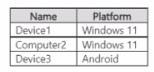
You create the device groups shown in the following table.
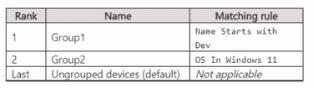
IP address indicators are defined as shown in the following table.
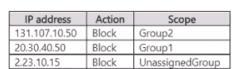
For each of the following statements, select Yes if the statement is true. Otherwise, select No.
NOTE: Each correct selection is worth one point

You have devices onboarded to Microsoft Defender for Endpoint as shown in the following table.
You create the device groups shown in the following table.
IP address indicators are defined as shown in the following table.
For each of the following statements, select Yes if the statement is true. Otherwise, select No.
NOTE: Each correct selection is worth one point

