

MS-700 Exam Question 126
Case Study 3: ADatum Corporation
Overview
Company Information
ADatum Corporation is an energy company that has offices across North America and 3,000 employees.
Physical Locations
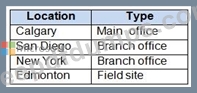
ADatum has the offices shown in the following table.
Existing Environment
Network Infrastructure
The office in Calgary has a 1-Gbps internet circuit. The offices in San Diego and New York have
100-Mbps internet circuits. The field site in Edmonton has a 3-Mbps internet circuit.
Departments
ADatum has the following departments:
- Information technology (IT)
- Project management
- Marketing
Microsoft 365 and Tenants Environment
ADatum recently purchased a Microsoft 365 E5 subscription that has the Microsoft Teams Domestic Calling Plan add-on. All users are assigned Microsoft 365 E5 and Microsoft Teams Domestic Calling Plan licenses and Calling Plans is deployed.
Azure AD has the default Cross-tenant access settings configured.
The Teams policies settings are configured as shown in the following exhibit.

The Teams client is deployed to a non-persistent Virtual Desktop Infrastructure (VDI) used by the project management department.
Allow guest access in Teams is set to Off.
The Microsoft Viva Connections app is deployed to all users.
Problem Statements
ADatum identifies the following issues:
- An executive at the San Diego office reports that video drops during Teams meetings.
- The Edmonton field site has limited bandwidth, and users report poor audio during Teams calls and meetings.
- Users in the project management department report that they cannot give or take control during Teams calls and meetings while sharing their VDI desktop.
Planned Changes
ADatum plans to implement the following changes:
- Configure the media bit rate settings for the users at the Edmonton field site. The settings must apply only to the user while they are at the site, but NOT when they are at a different office.
- Create a Teams channel to enable the project management department to collaborate with the IT department on a device upgrade project.
- Implement a pilot rollout of Operator Connect for the users in the New York office. A port re- quest was accepted already.
- Create a Teams channel for the marketing department for external collaboration.
- Rename the Viva Connections icon as Start portal.
Technical Requirements
ADatum identifies the following technical requirements:
- The marketing department requires that all the files shared by using Teams remain available for at least three years after deletion.
- The marketing department must be able to apply a watermark to content and video shared dur- ing Teams meetings.
- All users require indefinite access to training videos recorded in Teams by the IT department.
- All access to Teams and shared resources must use the principle of least privilege.
- Guest access must remain disabled.
You need to implement the planned changes for the marketing department.
Which two actions should you perform? Each correct answer presents part of the solution.
NOTE: Each correct selection is worth one point.
Overview
Company Information
ADatum Corporation is an energy company that has offices across North America and 3,000 employees.
Physical Locations
ADatum has the offices shown in the following table.
Existing Environment
Network Infrastructure
The office in Calgary has a 1-Gbps internet circuit. The offices in San Diego and New York have
100-Mbps internet circuits. The field site in Edmonton has a 3-Mbps internet circuit.
Departments
ADatum has the following departments:
- Information technology (IT)
- Project management
- Marketing
Microsoft 365 and Tenants Environment
ADatum recently purchased a Microsoft 365 E5 subscription that has the Microsoft Teams Domestic Calling Plan add-on. All users are assigned Microsoft 365 E5 and Microsoft Teams Domestic Calling Plan licenses and Calling Plans is deployed.
Azure AD has the default Cross-tenant access settings configured.
The Teams policies settings are configured as shown in the following exhibit.
The Teams client is deployed to a non-persistent Virtual Desktop Infrastructure (VDI) used by the project management department.
Allow guest access in Teams is set to Off.
The Microsoft Viva Connections app is deployed to all users.
Problem Statements
ADatum identifies the following issues:
- An executive at the San Diego office reports that video drops during Teams meetings.
- The Edmonton field site has limited bandwidth, and users report poor audio during Teams calls and meetings.
- Users in the project management department report that they cannot give or take control during Teams calls and meetings while sharing their VDI desktop.
Planned Changes
ADatum plans to implement the following changes:
- Configure the media bit rate settings for the users at the Edmonton field site. The settings must apply only to the user while they are at the site, but NOT when they are at a different office.
- Create a Teams channel to enable the project management department to collaborate with the IT department on a device upgrade project.
- Implement a pilot rollout of Operator Connect for the users in the New York office. A port re- quest was accepted already.
- Create a Teams channel for the marketing department for external collaboration.
- Rename the Viva Connections icon as Start portal.
Technical Requirements
ADatum identifies the following technical requirements:
- The marketing department requires that all the files shared by using Teams remain available for at least three years after deletion.
- The marketing department must be able to apply a watermark to content and video shared dur- ing Teams meetings.
- All users require indefinite access to training videos recorded in Teams by the IT department.
- All access to Teams and shared resources must use the principle of least privilege.
- Guest access must remain disabled.
You need to implement the planned changes for the marketing department.
Which two actions should you perform? Each correct answer presents part of the solution.
NOTE: Each correct selection is worth one point.
MS-700 Exam Question 127
Hotspot Question
You have a Microsoft 365 subscription.
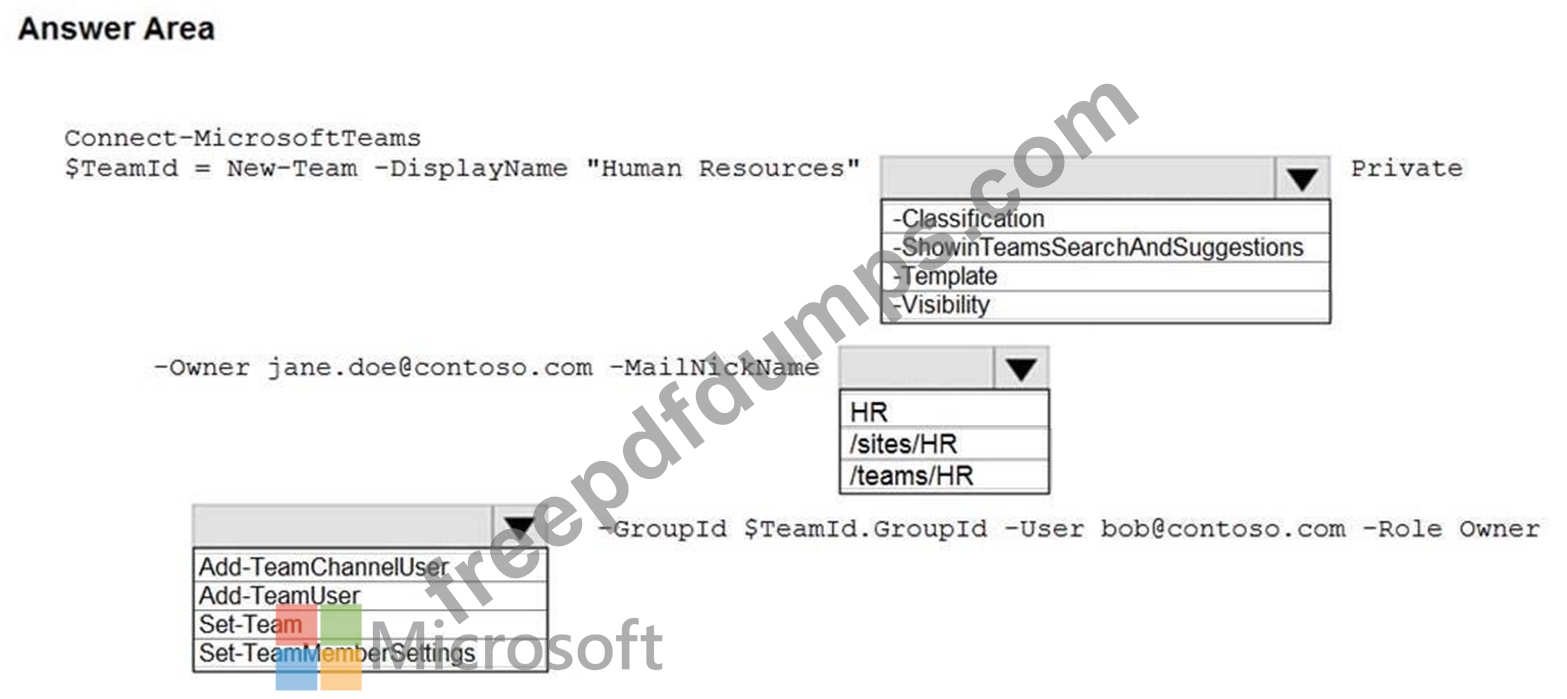
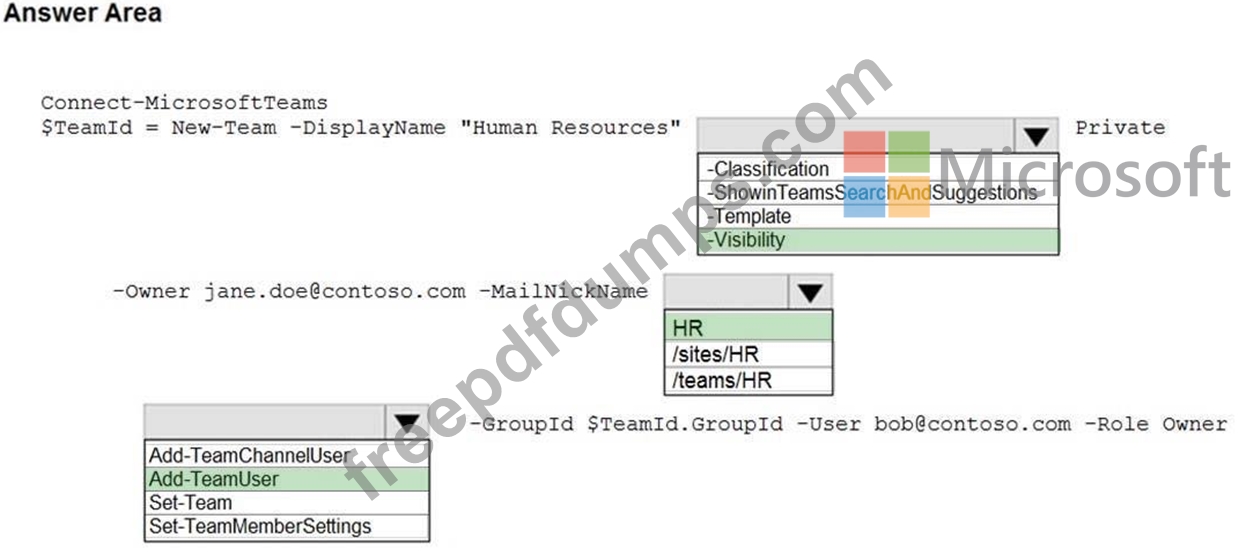
You need to create a new Microsoft Teams team named Human Resources that meets the following requirements:
- All join requests must be approved by an owner of the team.
- The URL for the Microsoft SharePoint Online site of the team must be
/teams/HR.
- Two users named [email protected] and [email protected] must be assigned as team owners.
How should you complete the PowerShell command? To answer, select the appropriate options in the answer area.
NOTE: Each correct selection is worth one point.
You have a Microsoft 365 subscription.
You need to create a new Microsoft Teams team named Human Resources that meets the following requirements:
- All join requests must be approved by an owner of the team.
- The URL for the Microsoft SharePoint Online site of the team must be
/teams/HR.
- Two users named [email protected] and [email protected] must be assigned as team owners.
How should you complete the PowerShell command? To answer, select the appropriate options in the answer area.
NOTE: Each correct selection is worth one point.
MS-700 Exam Question 128
SIMULATION
Please wait while the virtual machine loads. Once loaded, you may proceed to the lab section.
This may take a few minutes, and the wait time will not be deducted from your overall test time.
When the Next button is available, click it to access the lab section. In this section, you will perform a set of tasks in a live environment. While most functionality will be available to you as it would be in a live environment, some functionality (e.g. copy and paste, ability to navigate to external websites) will not be possible by design.
Scoring is based on the outcome of performing the tasks stated in the lab. In other words, it doesn't matter how you accomplish the task, if you successfully perform it, you will earn credit for that task.
Labs are not timed separately, and this exam may have more than one lab that you must complete. You can use as much time as you would like to complete each lab. But you should manage your time appropriately to ensure that you are able to complete the lab(s) and all other sections of the exam in the time provided.
Please not that once you submit your work by clicking the Next button within a lab, you will NOT be able to return to the lab.
You may now click next to proceed to the lab.
Username and password.
Use the following login credentials as needed:
To enter your username, place your cursor in the Sign in box and click on the username below.
To enter your password, place your cursor in the Enter password box and click on the password below.
Microsoft 365 Username:
[email protected]
Microsoft 365 Password: XXXXXXXXXXXX
If the Microsoft 365 portal does not load successfully in the browser, press CTRL-K to reload the portal in a new browser tab.
The following information is for technical support purposes only:
Lab Instance: 26178313
Task 7
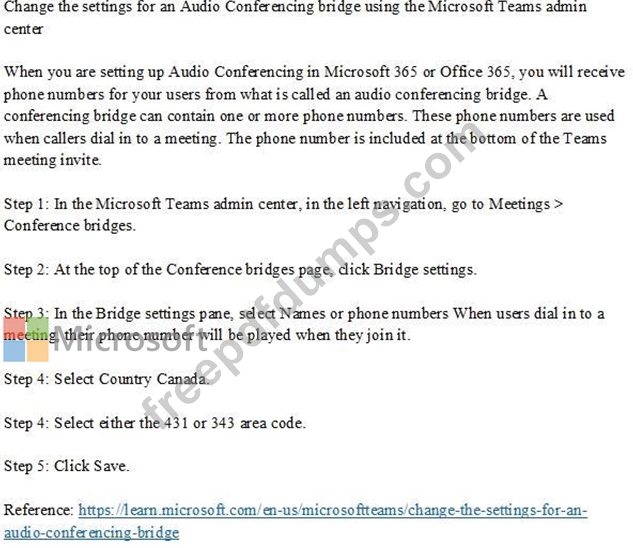
You need to acquire a dedicated Microsoft dial-in bridge number from either 431 or 343 area codes in Canada.
To complete this task, sign in to the Microsoft 365 portal.
Please wait while the virtual machine loads. Once loaded, you may proceed to the lab section.
This may take a few minutes, and the wait time will not be deducted from your overall test time.
When the Next button is available, click it to access the lab section. In this section, you will perform a set of tasks in a live environment. While most functionality will be available to you as it would be in a live environment, some functionality (e.g. copy and paste, ability to navigate to external websites) will not be possible by design.
Scoring is based on the outcome of performing the tasks stated in the lab. In other words, it doesn't matter how you accomplish the task, if you successfully perform it, you will earn credit for that task.
Labs are not timed separately, and this exam may have more than one lab that you must complete. You can use as much time as you would like to complete each lab. But you should manage your time appropriately to ensure that you are able to complete the lab(s) and all other sections of the exam in the time provided.
Please not that once you submit your work by clicking the Next button within a lab, you will NOT be able to return to the lab.
You may now click next to proceed to the lab.
Username and password.
Use the following login credentials as needed:
To enter your username, place your cursor in the Sign in box and click on the username below.
To enter your password, place your cursor in the Enter password box and click on the password below.
Microsoft 365 Username:
[email protected]
Microsoft 365 Password: XXXXXXXXXXXX
If the Microsoft 365 portal does not load successfully in the browser, press CTRL-K to reload the portal in a new browser tab.
The following information is for technical support purposes only:
Lab Instance: 26178313
Task 7
You need to acquire a dedicated Microsoft dial-in bridge number from either 431 or 343 area codes in Canada.
To complete this task, sign in to the Microsoft 365 portal.
MS-700 Exam Question 129
You have a Microsoft 365 E5 subscription.
You plan to use Teams.
You run the Microsoft 365 network connectivity test tool and generate a report.
You discover that the Microsoft Teams section of the report has a warning notification for media connectivity.
You suspect a firewall issue at the test location.
Which destination protocol and port range should you configure on the firewall?
You plan to use Teams.
You run the Microsoft 365 network connectivity test tool and generate a report.
You discover that the Microsoft Teams section of the report has a warning notification for media connectivity.
You suspect a firewall issue at the test location.
Which destination protocol and port range should you configure on the firewall?
MS-700 Exam Question 130
What does the information barrier policy do, and in which case is it feasible to implement?