PL-100 Exam Question 1
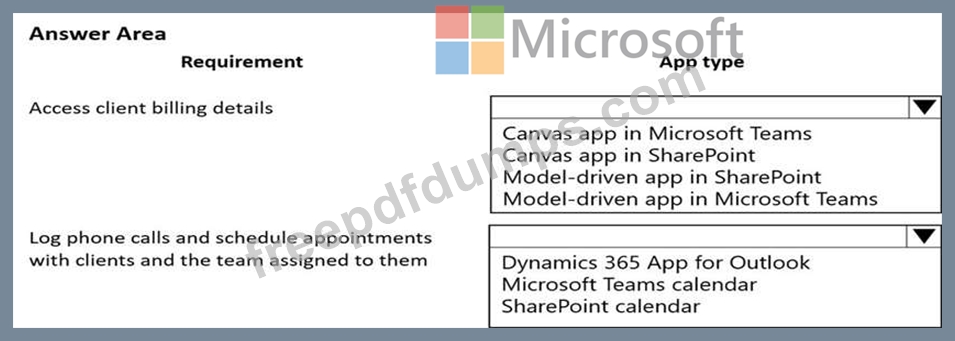
You are a technical assistant for a legal services organization. The company uses SharePoint to manage documents and Microsoft Dataverse as the data store. The company has strict rules about access, permissions, and privacy.
Lawyers and paralegals use Microsoft Teams for communications and collaboration. Employees use personal devices to access legal files. You do not have access to the admin area in Microsoft Power Platform.
You need to ensure that these rules are observed consistently and managed in one place.
Which type of app should you create? To answer, select the appropriate options in the answer area.
NOTE: Each correct selection is worth one point.
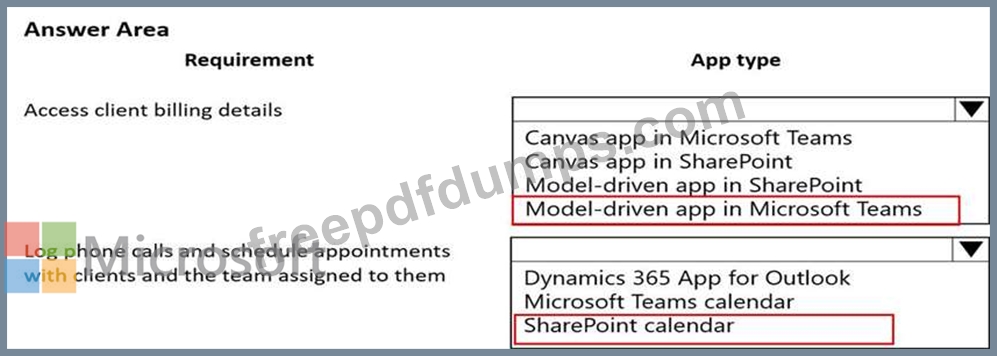
Lawyers and paralegals use Microsoft Teams for communications and collaboration. Employees use personal devices to access legal files. You do not have access to the admin area in Microsoft Power Platform.
You need to ensure that these rules are observed consistently and managed in one place.
Which type of app should you create? To answer, select the appropriate options in the answer area.
NOTE: Each correct selection is worth one point.
PL-100 Exam Question 2
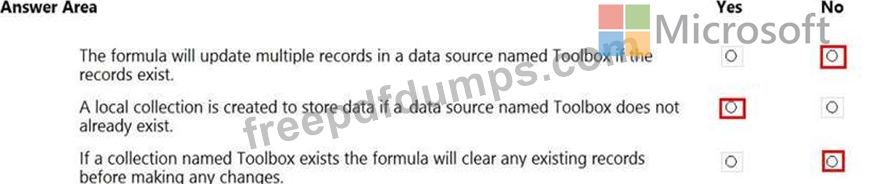
A coworker creates a canvas app.
The canvas app contains the following formul
a. The formula is attached to the OnVisible property of the first screen that users see:

You are updating the canvas app.
For each of the following statements, select Yes if the statement is true. Otherwise, select No.
NOTE: Each correct selection is worth one point.

The canvas app contains the following formul
a. The formula is attached to the OnVisible property of the first screen that users see:
You are updating the canvas app.
For each of the following statements, select Yes if the statement is true. Otherwise, select No.
NOTE: Each correct selection is worth one point.
PL-100 Exam Question 3
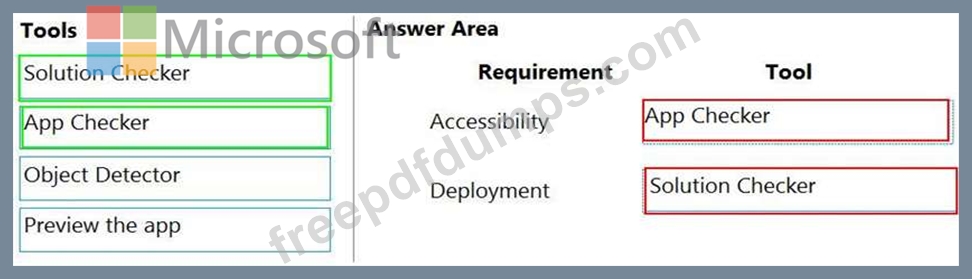
You need to ensure that the app can support the needs of User2 and User3, and meets the production deployment requirements.
Which tools should you use? To answer, select the appropriate tool in the answer area.
NOTE: Each correct selection is worth one point.

Which tools should you use? To answer, select the appropriate tool in the answer area.
NOTE: Each correct selection is worth one point.
PL-100 Exam Question 4
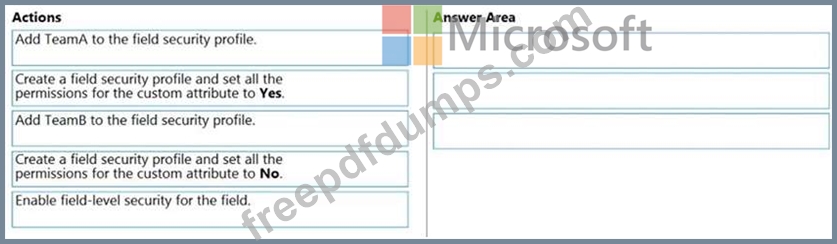
You create a custom field on the Account entity.
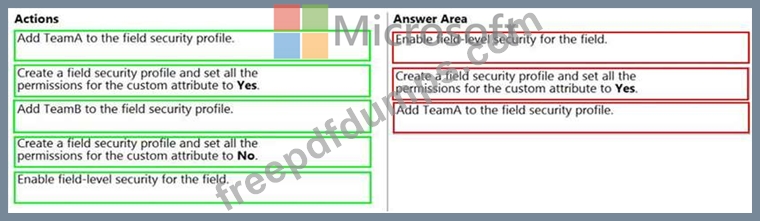
Members of TeamA must have full access to the field. Members of TeamB must have no access to the field.
You need to configure security.
Which three actions should you perform in sequence? To answer, move the appropriate actions from the list of actions to the answer area and arrange them in the correct order.
Members of TeamA must have full access to the field. Members of TeamB must have no access to the field.
You need to configure security.
Which three actions should you perform in sequence? To answer, move the appropriate actions from the list of actions to the answer area and arrange them in the correct order.
PL-100 Exam Question 5
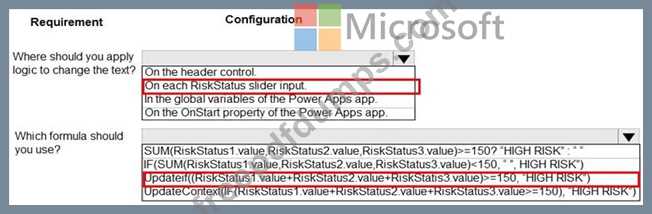
A company is building a Power Apps app to track key project tasks.
Users assign three tasks a risk status on a scale of 0 to 100 by using slider input controls named RiskStatus on the app. The highest risks use the risk status value of 100.

If the combined value of all the tasks is 150 or above, a header bar on the screen must display the text HIGH RISK.
You need to configure a solution to change the text on the header bar.
How should you configure the app? To answer, select the appropriate options in the answer area.
NOTE: Each correct selection is worth one point.

Users assign three tasks a risk status on a scale of 0 to 100 by using slider input controls named RiskStatus on the app. The highest risks use the risk status value of 100.
If the combined value of all the tasks is 150 or above, a header bar on the screen must display the text HIGH RISK.
You need to configure a solution to change the text on the header bar.
How should you configure the app? To answer, select the appropriate options in the answer area.
NOTE: Each correct selection is worth one point.