

PL-100 Exam Question 21
You need to configure the system to meet the requirements.
What should you use? To answer, select the appropriate options in the answer area.
NOTE: Each correct selection is worth one point.

What should you use? To answer, select the appropriate options in the answer area.
NOTE: Each correct selection is worth one point.

PL-100 Exam Question 22
A company is implementing the Microsoft Power Platform to assist with consolidation of onsite inspections and audits of retail stores. Currently, the data used by the retail store inspections is located across multiple systems.
The canvas app must use one database to view and record all data used in the inspection process.
You need to design the solution.
Which three capabilities should you implement? Each correct answer presents part of the solution.
NOTE: Each correct selection is worth one point.
The canvas app must use one database to view and record all data used in the inspection process.
You need to design the solution.
Which three capabilities should you implement? Each correct answer presents part of the solution.
NOTE: Each correct selection is worth one point.
PL-100 Exam Question 23
You need to configure the app to meet the requirements.
Which object properties should you configure? To answer, select the appropriate options in the answer area.
NOTE: Each correct selection is worth one point.
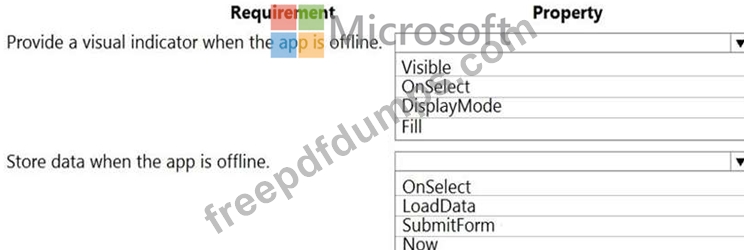
Which object properties should you configure? To answer, select the appropriate options in the answer area.
NOTE: Each correct selection is worth one point.

PL-100 Exam Question 24
You create a model-driven app for a company. The app will be used to manage events that the company organizes.
The Events entity ownership type is set to User or team. Members of the marketing team are assigned the MarketingTeam security role. All privileges for the role are set to User access.
All employees must be able to view event records. Only members of the marketing team are permitted to create or edit event records. You create a role named OtherEmployees.
You need to configure the MarketingTeam and OtherEmployees security roles.
Which three actions should you perform? Each correct selection presents a part of the solution.
NOTE: Each correct selection is worth one point.
The Events entity ownership type is set to User or team. Members of the marketing team are assigned the MarketingTeam security role. All privileges for the role are set to User access.
All employees must be able to view event records. Only members of the marketing team are permitted to create or edit event records. You create a role named OtherEmployees.
You need to configure the MarketingTeam and OtherEmployees security roles.
Which three actions should you perform? Each correct selection presents a part of the solution.
NOTE: Each correct selection is worth one point.
PL-100 Exam Question 25
DRAG DROP
You have a solution that contains a Power Automate flow, an environment variable, and a model-driven app.
Which three steps should you perform in sequence? To answer, move the appropriate actions from the list of actions to the answer area and arrange them in the correct order.
Select and Place:

You have a solution that contains a Power Automate flow, an environment variable, and a model-driven app.
Which three steps should you perform in sequence? To answer, move the appropriate actions from the list of actions to the answer area and arrange them in the correct order.
Select and Place:
