SC-400 Exam Question 71
You have a Microsoft 365 E5 subscription.
You use the following services:
- Microsoft Teams
- Microsoft Entra ID
- Microsoft OneDrive
- Microsoft Exchange Online
- Microsoft SharePoint Online
Which two services can you monitor by using Microsoft Purview communication compliance?
Each correct answer presents a complete solution.
NOTE: Each correct selection is worth one point.
You use the following services:
- Microsoft Teams
- Microsoft Entra ID
- Microsoft OneDrive
- Microsoft Exchange Online
- Microsoft SharePoint Online
Which two services can you monitor by using Microsoft Purview communication compliance?
Each correct answer presents a complete solution.
NOTE: Each correct selection is worth one point.
SC-400 Exam Question 72
You have a Microsoft 365 E5 tenant that has a retention label named Label1.
You need to create an auto-labeling policy that will apply Label1.
To which location can Label1 be applied?
You need to create an auto-labeling policy that will apply Label1.
To which location can Label1 be applied?
SC-400 Exam Question 73
Hotspot Question
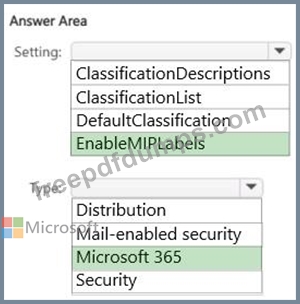
You have a Microsoft 365 E5 tenant that contains a published sensitivity label named Sensitivity1.
You plan to create a Microsoft Entra group named Group1 and assign Sensitivity1 to Group1.
How should you configure Group1? To answer, select the appropriate options in the answer area.
NOTE: Each correct selection is worth one point.

You have a Microsoft 365 E5 tenant that contains a published sensitivity label named Sensitivity1.
You plan to create a Microsoft Entra group named Group1 and assign Sensitivity1 to Group1.
How should you configure Group1? To answer, select the appropriate options in the answer area.
NOTE: Each correct selection is worth one point.
SC-400 Exam Question 74
You have a Microsoft 365 E5 subscription that uses Microsoft Purview. The subscription contains two groups named Group1 and Group2.
You need to implement a policy to detect messages that present a conflict of interest between the users in Group1 and the users in Group2.
What should you use in the Microsoft Purview compliance portal?
You need to implement a policy to detect messages that present a conflict of interest between the users in Group1 and the users in Group2.
What should you use in the Microsoft Purview compliance portal?
SC-400 Exam Question 75
SIMULATION
Use the following login credentials as needed:
To enter your username, place your cursor in the Sign in box and click on the username below.
To enter your password, place your cursor in the Enter password box and click on the password below.
Microsoft 365 Username: [email protected]
Microsoft 365 Password: **********
If the Microsoft 365 portal does not load successfully in the browser, press CTRL-K to reload the portal in a new browser tab.
The following information is for technical support purposes only:
Lab Instance: 12345678
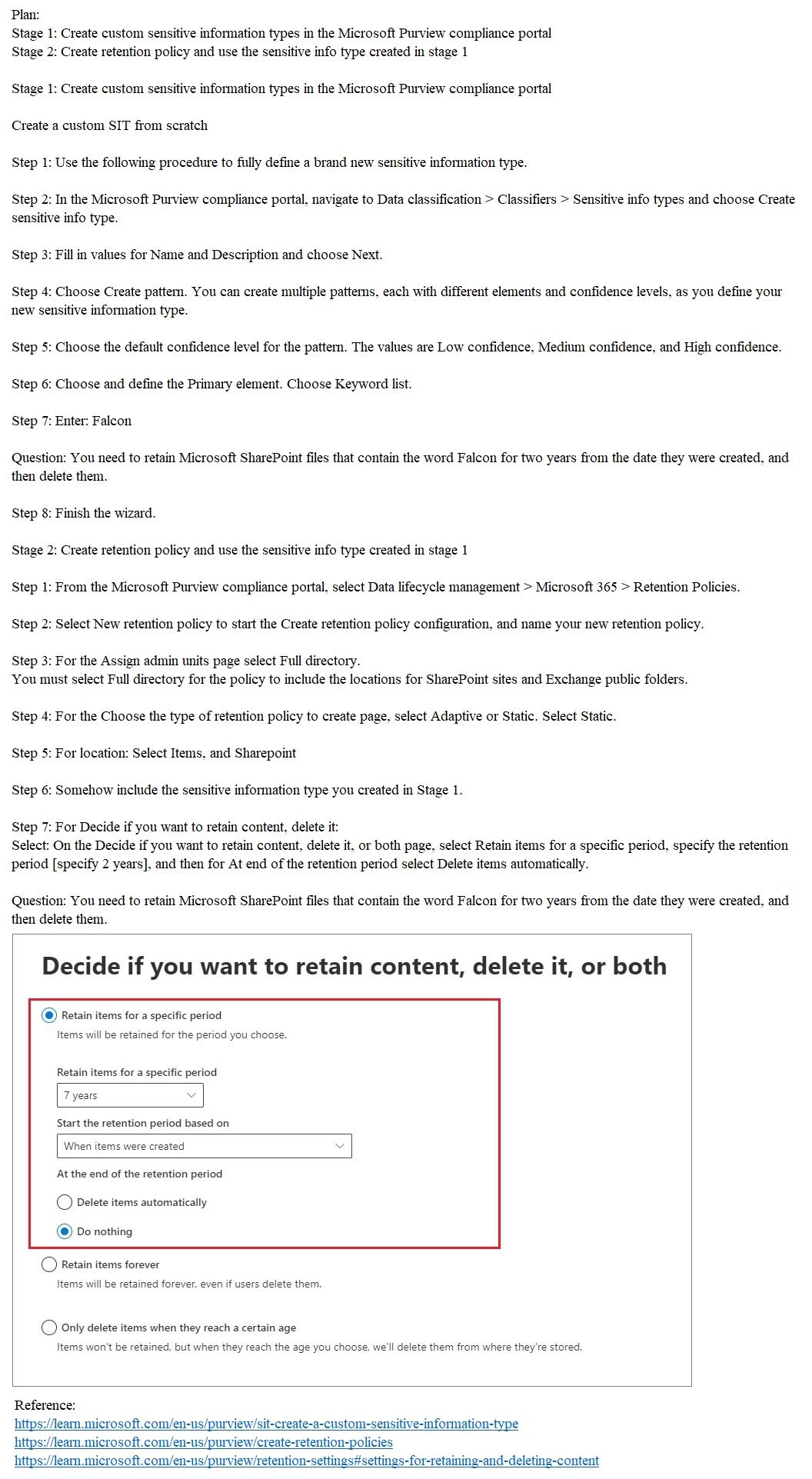
You need to retain Microsoft SharePoint files that contain the word Falcon for two years from the date they were created, and then delete them.
To complete this task, sign in to the appropriate admin center.
Use the following login credentials as needed:
To enter your username, place your cursor in the Sign in box and click on the username below.
To enter your password, place your cursor in the Enter password box and click on the password below.
Microsoft 365 Username: [email protected]
Microsoft 365 Password: **********
If the Microsoft 365 portal does not load successfully in the browser, press CTRL-K to reload the portal in a new browser tab.
The following information is for technical support purposes only:
Lab Instance: 12345678
You need to retain Microsoft SharePoint files that contain the word Falcon for two years from the date they were created, and then delete them.
To complete this task, sign in to the appropriate admin center.