

SC-400 Exam Question 56
Hotspot Question
You have a Microsoft E5 subscription that contains two users named User1 and User2.
You have a Microsoft SharePoint site named Site1. Site1 stores files that contain IP addresses as shown in the following table.

User1 is assigned the SharePoint admin role for Site1. User2 is a member of Site1.
You create the data loss prevention (DLP) policy shown in the following exhibit.

For each of the following statements, select Yes if the statement is true. Otherwise, select No.
NOTE: Each correct selection is worth one point.

You have a Microsoft E5 subscription that contains two users named User1 and User2.
You have a Microsoft SharePoint site named Site1. Site1 stores files that contain IP addresses as shown in the following table.
User1 is assigned the SharePoint admin role for Site1. User2 is a member of Site1.
You create the data loss prevention (DLP) policy shown in the following exhibit.
For each of the following statements, select Yes if the statement is true. Otherwise, select No.
NOTE: Each correct selection is worth one point.

SC-400 Exam Question 57
You have a Microsoft 365 subscription.
From Microsoft Purview, you plan to create a content search for email messages that have a recipient of either [email protected] or user2.contoso.com.
You need to add a condition to the KQL editor for the content search.
Which KQL query should you add as a condition?
From Microsoft Purview, you plan to create a content search for email messages that have a recipient of either [email protected] or user2.contoso.com.
You need to add a condition to the KQL editor for the content search.
Which KQL query should you add as a condition?
SC-400 Exam Question 58
Hotspot Question
You have a Microsoft 365 E5 subscription that contains the users shown in the following table.

You create an assessment named Assesment1 as shown in the following exhibit.
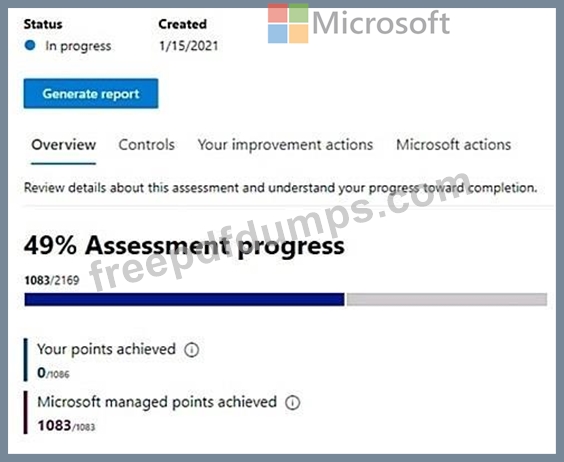
Which users can update the title of Assessment1, and which users can add User5 to the Compliance Manager Readers role group? To answer, select the appropriate options in the answer area.
NOTE: Each correct selection is worth one point.

You have a Microsoft 365 E5 subscription that contains the users shown in the following table.
You create an assessment named Assesment1 as shown in the following exhibit.
Which users can update the title of Assessment1, and which users can add User5 to the Compliance Manager Readers role group? To answer, select the appropriate options in the answer area.
NOTE: Each correct selection is worth one point.

SC-400 Exam Question 59
Hotspot Question
You have a Microsoft 365 E5 subscription.
You are implementing insider risk management.
You need to create an insider risk management notice template and format the message body of the notice template.
How should you configure the template? To answer, select the appropriate options in the answer area.
NOTE: Each correct selection is worth one point.

You have a Microsoft 365 E5 subscription.
You are implementing insider risk management.
You need to create an insider risk management notice template and format the message body of the notice template.
How should you configure the template? To answer, select the appropriate options in the answer area.
NOTE: Each correct selection is worth one point.

SC-400 Exam Question 60
SIMULATION
Use the following login credentials as needed:
To enter your username, place your cursor in the Sign in box and click on the username below.
To enter your password, place your cursor in the Enter password box and click on the password below.
Microsoft 365 Username: [email protected]
Microsoft 365 Password: **********
If the Microsoft 365 portal does not load successfully in the browser, press CTRL-K to reload the portal in a new browser tab.
The following information is for technical support purposes only:
Lab Instance: 12345678
You need to block users from sending emails containing information that is subject to Payment Card Industry Data Security Standard (PCI DSS). The solution must affect only emails.
To complete this task, sign in to the appropriate admin center.
Use the following login credentials as needed:
To enter your username, place your cursor in the Sign in box and click on the username below.
To enter your password, place your cursor in the Enter password box and click on the password below.
Microsoft 365 Username: [email protected]
Microsoft 365 Password: **********
If the Microsoft 365 portal does not load successfully in the browser, press CTRL-K to reload the portal in a new browser tab.
The following information is for technical support purposes only:
Lab Instance: 12345678
You need to block users from sending emails containing information that is subject to Payment Card Industry Data Security Standard (PCI DSS). The solution must affect only emails.
To complete this task, sign in to the appropriate admin center.
