
- Home
- Python Institute
- PCPP-32-101
- PythonInstitute.PCPP-32-101.v2023-06-15.q20 Practice Test (Page 3)

PCPP-32-101 Exam Question 6
Select the true statements about the connection-oriented and connectionless types of communication. (Select two answers.)
Correct Answer: A,D
Explanation
In the context of TCP/IP networks, the communication side that initiates a connection is called the client, whereas the side that answers the client is called the server.
This statement is true because TCP/IP networks use a client-server model to establish connection-oriented communications. The client is the device or application that requests a service or resource from another device or application, which is called the server. The server responds to the client's request and provides the service or resource.For example, when you browse a website using a web browser, the browser acts as a client and sends a request to the web server that hosts the website. The web server acts as a server and sends back the requested web page to the browser1.
Connectionless communications are usually built on top of TCP.
This statement is false because TCP (Transmission Control Protocol) is a connection-oriented protocol that requires establishing and terminating a connection before and after sending data. Connectionless communications are usually built on top of UDP (User Datagram Protocol), which is a connectionless protocol that does not require any connection setup or teardown. UDP simply sends data packets to the destination without checking if they are received or not2.
Using walkie-talkies is an example of a connection-oriented communication.
This statement is false because using walkie-talkies is an example of a connectionless communication.
Walkie-talkies do not establish a dedicated channel or connection between the sender and receiver before transmitting data. They simply broadcast data over a shared frequency without ensuring that the receiver is ready or available to receive it. The sender does not know if the receiver has received the data or not3.
A phone call is an example of a connection-oriented communication.
This statement is true because a phone call is an example of a connection-oriented communication. A phone call requires setting up a circuit or connection between the caller and callee before exchanging voice data. The caller and callee can hear each other's voice and know if they are connected or not. The phone call also requires terminating the connection when the conversation is over4.
References:
1: https://www.techtarget.com/searchnetworking/definition/client-server 2:
https://www.javatpoint.com/connection-oriented-vs-connectionless-service 3:
https://en.wikipedia.org/wiki/Walkie-talkie 4: https://en.wikipedia.org/wiki/Telephone_call A is true because in the context of TCP/IP networks, the communication side that initiates a connection is called the client, and the side that answers the client is called the server. This is the basis for establishing a connection-oriented communication.
D is true because a phone call is an example of a connection-oriented communication. Like TCP/IP, a phone call establishes a connection between two devices (in this case, two phones) before communication can occur.
A is true because in the context of TCP/IP networks, the communication side that initiates a connection is called the client, and the side that answers the client is called the server. This is the basis for establishing a connection-oriented communication.
D is true because a phone call is an example of a connection-oriented communication. Like TCP/IP, a phone call establishes a connection between two devices (in this case, two phones) before communication can occur.
B is false because connectionless communications are usually built on top of UDP, not TCP. UDP is a connectionless protocol that does not establish a connection before sending data.
C is false because using walkie-talkies is an example of a connectionless communication. Walkie-talkies do not establish a connection before communication begins, and messages are simply broadcasted to all devices within range.
Here is a sample code in Python using the socket module to create a TCP server and client to demonstrate the connection-oriented communication:
Server-side code:
importsocket
HOST ='127.0.0.1'
PORT =8080
with socket.socket(socket.AF_INET, socket.SOCK_STREAM) as s:
s.bind((HOST, PORT))
s.listen()
conn, addr = s.accept()
with conn:
print('Connected by', addr)
whileTrue:
data = conn.recv(1024)
ifnotdata:
break
conn.sendall(data)
Client-side code:
importsocket
HOST ='127.0.0.1'
PORT =8080
with socket.socket(socket.AF_INET, socket.SOCK_STREAM) as s:
s.connect((HOST, PORT))
s.sendall(b'Hello, world')
data = s.recv(1024)
print('Received',repr(data))
The server listens for incoming connections on port 8080, and when a connection is established, it prints the address of the client that has connected. The server then continuously receives data from the client and sends it back to the client until the connection is closed.
The client establishes a connection with the server and sends the message "Hello, world" encoded as bytes. It then waits for a response from the server and prints the data it receives.
In the context of TCP/IP networks, the communication side that initiates a connection is called the client, whereas the side that answers the client is called the server.
This statement is true because TCP/IP networks use a client-server model to establish connection-oriented communications. The client is the device or application that requests a service or resource from another device or application, which is called the server. The server responds to the client's request and provides the service or resource.For example, when you browse a website using a web browser, the browser acts as a client and sends a request to the web server that hosts the website. The web server acts as a server and sends back the requested web page to the browser1.
Connectionless communications are usually built on top of TCP.
This statement is false because TCP (Transmission Control Protocol) is a connection-oriented protocol that requires establishing and terminating a connection before and after sending data. Connectionless communications are usually built on top of UDP (User Datagram Protocol), which is a connectionless protocol that does not require any connection setup or teardown. UDP simply sends data packets to the destination without checking if they are received or not2.
Using walkie-talkies is an example of a connection-oriented communication.
This statement is false because using walkie-talkies is an example of a connectionless communication.
Walkie-talkies do not establish a dedicated channel or connection between the sender and receiver before transmitting data. They simply broadcast data over a shared frequency without ensuring that the receiver is ready or available to receive it. The sender does not know if the receiver has received the data or not3.
A phone call is an example of a connection-oriented communication.
This statement is true because a phone call is an example of a connection-oriented communication. A phone call requires setting up a circuit or connection between the caller and callee before exchanging voice data. The caller and callee can hear each other's voice and know if they are connected or not. The phone call also requires terminating the connection when the conversation is over4.
References:
1: https://www.techtarget.com/searchnetworking/definition/client-server 2:
https://www.javatpoint.com/connection-oriented-vs-connectionless-service 3:
https://en.wikipedia.org/wiki/Walkie-talkie 4: https://en.wikipedia.org/wiki/Telephone_call A is true because in the context of TCP/IP networks, the communication side that initiates a connection is called the client, and the side that answers the client is called the server. This is the basis for establishing a connection-oriented communication.
D is true because a phone call is an example of a connection-oriented communication. Like TCP/IP, a phone call establishes a connection between two devices (in this case, two phones) before communication can occur.
A is true because in the context of TCP/IP networks, the communication side that initiates a connection is called the client, and the side that answers the client is called the server. This is the basis for establishing a connection-oriented communication.
D is true because a phone call is an example of a connection-oriented communication. Like TCP/IP, a phone call establishes a connection between two devices (in this case, two phones) before communication can occur.
B is false because connectionless communications are usually built on top of UDP, not TCP. UDP is a connectionless protocol that does not establish a connection before sending data.
C is false because using walkie-talkies is an example of a connectionless communication. Walkie-talkies do not establish a connection before communication begins, and messages are simply broadcasted to all devices within range.
Here is a sample code in Python using the socket module to create a TCP server and client to demonstrate the connection-oriented communication:
Server-side code:
importsocket
HOST ='127.0.0.1'
PORT =8080
with socket.socket(socket.AF_INET, socket.SOCK_STREAM) as s:
s.bind((HOST, PORT))
s.listen()
conn, addr = s.accept()
with conn:
print('Connected by', addr)
whileTrue:
data = conn.recv(1024)
ifnotdata:
break
conn.sendall(data)
Client-side code:
importsocket
HOST ='127.0.0.1'
PORT =8080
with socket.socket(socket.AF_INET, socket.SOCK_STREAM) as s:
s.connect((HOST, PORT))
s.sendall(b'Hello, world')
data = s.recv(1024)
print('Received',repr(data))
The server listens for incoming connections on port 8080, and when a connection is established, it prints the address of the client that has connected. The server then continuously receives data from the client and sends it back to the client until the connection is closed.
The client establishes a connection with the server and sends the message "Hello, world" encoded as bytes. It then waits for a response from the server and prints the data it receives.
PCPP-32-101 Exam Question 7
Which of the following methods allow you to load a configuration using ConfigParser? (Select two answers.)
Correct Answer: A,D
Explanation
ConfigParser is a built-in library in Python that allows you to read and write configuration files. The read method is used to read the configuration file which can be in any of the supported file formats, such as INI, YAML, and JSON. The read_dict method is used to read the configuration from a Python dictionary. The read_conf and read_str options are not valid methods in the ConfigParser module.
Therefore, the correct options to load a configuration using ConfigParser are A. read and D. read_string.
ConfigParser is a built-in library in Python that allows you to read and write configuration files. The read method is used to read the configuration file which can be in any of the supported file formats, such as INI, YAML, and JSON. The read_dict method is used to read the configuration from a Python dictionary. The read_conf and read_str options are not valid methods in the ConfigParser module.
Therefore, the correct options to load a configuration using ConfigParser are A. read and D. read_string.
PCPP-32-101 Exam Question 8
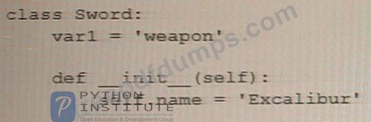
Analyze the following snippet and choose the best statement that describes it.
Correct Answer: C
Explanation
The correct answer is C. Excalibur is the value passed to an instance variable. In the given code snippet, self.name is an instance variable of the Sword class. When an instance of the Sword class is created with varl = Sword('Excalibur'), the value 'Excalibur' is passed as an argument to the __init__ method and assigned to the name instance variable of the varl object.
The code defines a class called Sword with an __init__ method that takes one parameter name. When a new instance of the Sword class is created with varl = Sword('Excalibur'), the value of the 'Excalibur' string is passed as an argument to the __init__ method, and assigned to the self.name instance variable of the varl object.
The correct answer is C. Excalibur is the value passed to an instance variable. In the given code snippet, self.name is an instance variable of the Sword class. When an instance of the Sword class is created with varl = Sword('Excalibur'), the value 'Excalibur' is passed as an argument to the __init__ method and assigned to the name instance variable of the varl object.
The code defines a class called Sword with an __init__ method that takes one parameter name. When a new instance of the Sword class is created with varl = Sword('Excalibur'), the value of the 'Excalibur' string is passed as an argument to the __init__ method, and assigned to the self.name instance variable of the varl object.
PCPP-32-101 Exam Question 9
If w is a correctly created main application window, which method would you use to foe both of the main window's dimensions?
Correct Answer: C
Explanation
w.resizable()
The resizable() method takes two Boolean arguments, width and height, that specify whether the main window can be resized in the corresponding directions. Passing False to both arguments makes the main window non-resizable, whereas passing True to both arguments (or omitting them) makes the window resizable.
Here is an example that sets the dimensions of the main window to 500x400 pixels and makes it non-resizable:
importtkinter as tk
root = tk.Tk()
root.geometry("500x400")
root.resizable(False, False)
root.mainloop()
References:
* Tkinter documentation: https://docs.python.org/3/library/tk.html
* Tkinter tutorial: https://www.python-course.eu/python_tkinter.php
The resizable () method of a tkinter window object allows you to specify whether the window can be resized by the user in the horizontal and vertical directions. You can pass two boolean arguments to this method, such as w.resizable (False, False), to prevent both dimensions from being changed. Alternatively, you can pass 0 or
1 as arguments, such as w.resizable (0, 0), to achieve the same effect1.
References:
1: https://stackoverflow.com/questions/36575890/how-to-set-a-tkinter-window-to-a-constant-size Other methods that can be used to control the window size are:
* w.geometry () : This method allows you to set the initial size and position of the window by passing a string argument in the format "widthxheight+x+y", such as w.geometry ("500x500+100+100")12.
* w.minsize () and w.maxsize (): These methods allow you to set the minimum and maximum size of the window in pixels, such as w.minsize (500, 500) and w.maxsize (1000, 1000)12.
* w.pack_propagate () and w.grid_propagate (): These methods allow you to enable or disable the propagation of the size of the widgets inside the window to the window itself. By default, these methods are set to True, which means that the window will adjust its size according to the widgets it contains.
You can set these methods to False or 0 to prevent this behavior, such as w.pack_propagate (0) or w.grid_propagate (0).
* w.place (): This method allows you to place the window at a specific position and size relative to its parent window or screen. You can use keyword arguments such as x, y, width, height, relx, rely, relwidth, and relheight to specify the coordinates and dimensions of the window in absolute or relative terms, such as w.place (x=0, y=0, relwidth=1, relheight=1).
References:
2: https://stackoverflow.com/questions/25690423/set-window-dimensions-in-tkinter-python-3 :
https://stackoverflow.com/questions/36575890/how-to-set-a-tkinter-window-to-a-constant-size/36576068#36576
https://www.skotechlearn.com/2020/06/tkinter-window-position-size-center-screen-in-python.html
w.resizable()
The resizable() method takes two Boolean arguments, width and height, that specify whether the main window can be resized in the corresponding directions. Passing False to both arguments makes the main window non-resizable, whereas passing True to both arguments (or omitting them) makes the window resizable.
Here is an example that sets the dimensions of the main window to 500x400 pixels and makes it non-resizable:
importtkinter as tk
root = tk.Tk()
root.geometry("500x400")
root.resizable(False, False)
root.mainloop()
References:
* Tkinter documentation: https://docs.python.org/3/library/tk.html
* Tkinter tutorial: https://www.python-course.eu/python_tkinter.php
The resizable () method of a tkinter window object allows you to specify whether the window can be resized by the user in the horizontal and vertical directions. You can pass two boolean arguments to this method, such as w.resizable (False, False), to prevent both dimensions from being changed. Alternatively, you can pass 0 or
1 as arguments, such as w.resizable (0, 0), to achieve the same effect1.
References:
1: https://stackoverflow.com/questions/36575890/how-to-set-a-tkinter-window-to-a-constant-size Other methods that can be used to control the window size are:
* w.geometry () : This method allows you to set the initial size and position of the window by passing a string argument in the format "widthxheight+x+y", such as w.geometry ("500x500+100+100")12.
* w.minsize () and w.maxsize (): These methods allow you to set the minimum and maximum size of the window in pixels, such as w.minsize (500, 500) and w.maxsize (1000, 1000)12.
* w.pack_propagate () and w.grid_propagate (): These methods allow you to enable or disable the propagation of the size of the widgets inside the window to the window itself. By default, these methods are set to True, which means that the window will adjust its size according to the widgets it contains.
You can set these methods to False or 0 to prevent this behavior, such as w.pack_propagate (0) or w.grid_propagate (0).
* w.place (): This method allows you to place the window at a specific position and size relative to its parent window or screen. You can use keyword arguments such as x, y, width, height, relx, rely, relwidth, and relheight to specify the coordinates and dimensions of the window in absolute or relative terms, such as w.place (x=0, y=0, relwidth=1, relheight=1).
References:
2: https://stackoverflow.com/questions/25690423/set-window-dimensions-in-tkinter-python-3 :
https://stackoverflow.com/questions/36575890/how-to-set-a-tkinter-window-to-a-constant-size/36576068#36576
https://www.skotechlearn.com/2020/06/tkinter-window-position-size-center-screen-in-python.html
PCPP-32-101 Exam Question 10
What is true about the unbind () method? (Select two answers.)
Correct Answer: B,D
Explanation
Option B is true because the unbind() method is invoked from within a widget's object 1.
Option D is true because the unbind() method needs the event name as an argument 1.
The unbind() method in Tkinter is used to remove a binding between an event and a function. It can be invoked from within a widget's object when a binding is no longer needed. The method requires the event name as an argument to remove the binding for that specific event. For example:
button = tk.Button(root, text="Click me")
button.bind("<Button-1>", callback_function) # bind left mouse click event to callback_function button.unbind("<Button-1>") # remove the binding for the left mouse click event
Option B is true because the unbind() method is invoked from within a widget's object 1.
Option D is true because the unbind() method needs the event name as an argument 1.
The unbind() method in Tkinter is used to remove a binding between an event and a function. It can be invoked from within a widget's object when a binding is no longer needed. The method requires the event name as an argument to remove the binding for that specific event. For example:
button = tk.Button(root, text="Click me")
button.bind("<Button-1>", callback_function) # bind left mouse click event to callback_function button.unbind("<Button-1>") # remove the binding for the left mouse click event
- Other Version
- 146PythonInstitute.PCPP-32-101.v2026-08-10.q34
- Latest Upload
- 133Fortinet.NSE7_SSE_AD-25.v2026-08-12.q38
- 159CyberAB.CMMC-CCP.v2026-08-12.q96
- 131SAP.C_ARCON.v2026-08-12.q39
- 125SAP.C_CR125.v2026-08-12.q33
- 125NetworkAppliance.NS0-094.v2026-08-12.q38
- 129Netskope.NSK200.v2026-08-11.q42
- 165Oracle.1Z0-997-25.v2026-08-11.q136
- 147Salesforce.Als-Con-201.v2026-08-11.q58
- 130SAP.C_ARP2P.v2026-08-11.q33
- 152VMware.250-608.v2026-08-11.q62
[×]
Download PDF File
Enter your email address to download PythonInstitute.PCPP-32-101.v2023-06-15.q20 Practice Test