You have configured an application control profile, set peer-o-peer traffic to Block under the Categories tab, and applied it to the firewall policy. However, you peer-to-peer traffic on known ports is passing through the FortiGate without being blocked. What FortiGate settings should you check to resolve this issue?
Correct Answer: C
"After the IPS engine examines the traffic stream for a signature match, FortiGate scans packets for matches, in this order, for the application control profile: 1. Application and filter overrides..." "Because application overrides are applied first in the scan, these two applications are allowed and generate logs." "The priority in which application and filter overrides are placed takes precedence." Technical Deep Dive: The correct answer is C. Application and Filter Overrides. If you already set the P2P category to Block, but some peer-to-peer traffic is still being allowed, the first thing to check is whether there is an application override or filter override that matches that traffic before the category action is applied. FortiGate processes Application and Filter Overrides before Categories, so any matching override set to Allow or Monitor will effectively bypass the category block. Why the others are wrong: A only affects user-facing block-page behavior for HTTP/HTTPS applications, not whether P2P is blocked. B is for enforcing expected services on expected ports and for blocking applications on non-default ports. It is not the first place to look when a category block is being bypassed. D concerns web categorization, not application-control category enforcement. Operationally, this is a classic troubleshooting sequence: first inspect the override table, then the category action, then logs under Application Control to see which signature and action actually matched.
NSE4_FGT_AD-7.6 Exam Question 2
Which two statements about equal-cost multi-path (ECMP) configuration on FortiGate are true? (Choose two answers)
Correct Answer: A,D
"If SD-WAN is disabled, you can change the ECMP load balancing algorithm on the FortiGate CLI using the commands shown on this slide." "When SD-WAN is enabled, FortiOS hides the v4-ecmp-mode setting and replaces it with the load-balance-mode setting under config system sdwan. That is, when you enable SD-WAN, you control the ECMP algorithm with the load-balance-mode setting." "There are some differences between the two settings. The main difference is that load-balance-mode supports the volume algorithm, and v4-ecmp-mode does not." "These routes are called equal cost multipath (ECMP) routes..." Technical Deep Dive: The correct answers are A and D. A is correct because when SD-WAN is enabled, FortiOS no longer uses v4-ecmp-mode; it uses load-balance-mode under config system sdwan. That is the explicit SD-WAN control point for ECMP behavior. D is correct because when SD-WAN is disabled, ECMP configuration is done in the regular system routing settings, not under SD-WAN. The study guide states that you change the ECMP algorithm on the FortiGate CLI when SD-WAN is disabled, which corresponds to the classic config system settings ECMP controls. Why the others are wrong: B is wrong because the guide explicitly says load-balance-mode supports volume, while v4-ecmp-mode does not. So you cannot set v4-ecmp-mode to volume-based. C is wrong because ECMP requires equal-cost routes. If distance or priority differ, they are no longer ECMP candidates; FortiGate selects the preferred route instead. The concept of ECMP itself requires equal route cost attributes. From an implementation standpoint, the common CLI patterns are: config system settings set v4-ecmp-mode source-ip-based end and, with SD-WAN enabled: config system sdwan set load-balance-mode source-ip-based end On hardware platforms, ECMP still affects session distribution at the routing decision stage before later security services are applied. NP offload can accelerate forwarding after route selection, but the ECMP decision itself is a FortiOS control-plane routing function.
NSE4_FGT_AD-7.6 Exam Question 3
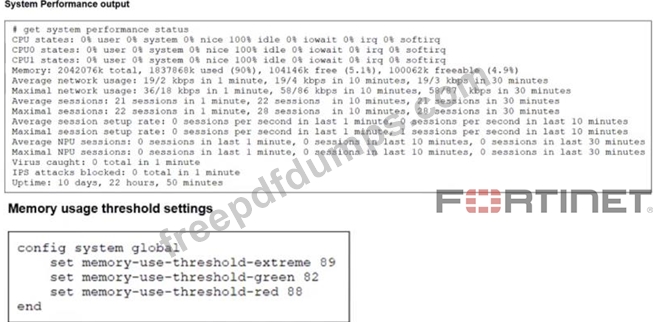
Refer to the exhibits. The exhibits show the system performance output and default configuration of high memory usage thresholds on a FortiGate device. Based on the system performance output, what are the two possible outcomes? (Choose two.)
Correct Answer: A,D
"Three different configurable thresholds define when FortiGate enters and exits conserve mode. If memory usage goes above the percentage of total RAM defined as the red threshold, FortiGate enters conserve mode." "If memory usage keeps increasing, it might exceed the extreme threshold. While memory usage is above this highest threshold, all new sessions are dropped." "What actions does FortiGate take to preserve memory while in conserve mode? * FortiGate does not accept configuration changes, because they might increase memory usage." "However, if the memory usage exceeds the extreme threshold, new sessions are always dropped, regardless of the FortiGate configuration." Technical Deep Dive: The system performance output shows Memory: 2042076k total, 1837868k used (90%). The configured thresholds shown are: green = 82 red = 88 extreme = 89 Because memory usage is 90%, it is: Above the red threshold (88%) → so FortiGate has entered conserve mode Above the extreme threshold (89%) → so all new sessions are dropped That makes A and D correct. Why the others are wrong: B is not stated anywhere in the study guide as an automatic outcome of conserve mode. C is the opposite of what the guide says. In conserve mode, FortiGate does not accept configuration changes. A useful verification command is: diagnose hardware sysinfo conserve Operationally, once a FortiGate crosses the red threshold, it starts protecting itself by limiting behavior that could increase memory usage. Once it crosses the extreme threshold, it becomes more severe and drops new sessions to keep the system from becoming unstable.
NSE4_FGT_AD-7.6 Exam Question 4
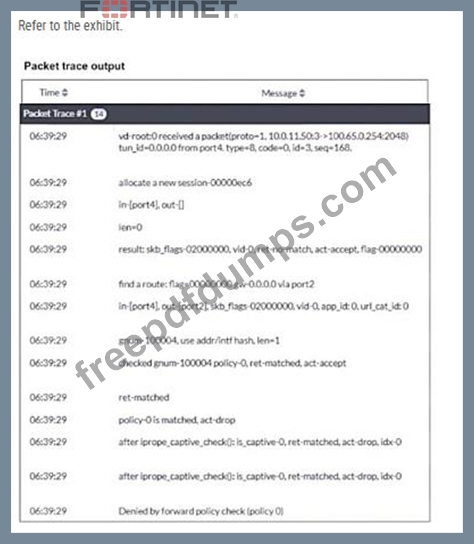
Refer to the exhibit. Why did the FortiGate device drop the packet?
Correct Answer: A
"FortiGate looks for the matching firewall policy from top-to-bottom and, if a match is found, the traffic is processed based on the firewall policy. If no match is found, the traffic is dropped by the default implicit deny firewall policy." Technical Deep Dive: The debug flow output clearly points to the implicit deny: ret-no-match policy-0 is matched, act-drop Denied by forward policy check (policy 0) On FortiGate, policy 0 is the internal representation of the default implicit deny firewall policy. That means the packet did not match any user-defined forward firewall policy, so FortiGate dropped it automatically. Why the other options are wrong: B is wrong because an RPF failure would show a reverse-path-related drop reason, not Denied by forward policy check (policy 0). C is wrong because the trace does not show a matched explicit policy ID with deny action; it shows policy 0, which is the implicit rule. D is wrong because the trace actually shows a route lookup result: find a route: ... gw-0.0.0.0 via port2. So this is not a next-hop reachability failure. In packet-flow troubleshooting, this pattern is one of the most important to recognize. If you see policy 0 in FortiGate debug flow, the first things to verify are: diagnose debug flow filter addr <src_or_dst_ip> diagnose debug flow show function-name enable diagnose debug enable Then review whether a firewall policy exists with the correct incoming interface, outgoing interface, source, destination, schedule, and service. If any one of those does not match, FortiGate falls through to policy 0 and drops the session.
NSE4_FGT_AD-7.6 Exam Question 5
An administrator wanted to configure an IPS sensor to block traffic that triggers the signature set number of times during a specific time period. How can the administrator achieve the objective?
Correct Answer: C
"Rate-based IPS signatures also allows you to detect anomalies, which are unusual behaviors in the network..." "There are two ways to add predefined signatures to an IPS sensor. One way is to select the signatures individually... The second way to add a signature to a sensor is using filters." "You can also add rate-based signatures to block specific traffic when the threshold is exceeded. On the CLI, If you set the command rate-mode to periodical, FortiGate triggers the action when the threshold is reached during the configured Duration time period." Technical Deep Dive: The correct answer is C. Use IPS signatures, rate-mode periodical option. The guide is explicit that this behavior belongs to rate-based IPS signatures. The question asks for blocking traffic when a signature is triggered a certain number of times within a defined interval. That is exactly what rate-mode periodical does: it evaluates the trigger count over the configured duration window and then applies the configured IPS action when the threshold is met. Why the other options are wrong: A is wrong because rate-mode 60 is not the documented syntax or method. B is wrong because packet logging records packets; it does not implement threshold-based blocking logic. D is wrong because the guide ties rate-mode periodical to rate-based signatures, not to IPS filters as the mechanism for this threshold behavior. Operationally, this is used for anomaly-style detection, similar in concept to lightweight rate-based protection. A typical CLI pattern is along these lines: config ips sensor edit "custom-ips" config entries edit 1 set rule <signature_id> set rate-mode periodical set rate-count <threshold> set rate-duration <seconds> set action block next end next end This works best when applied only to relevant protocols and signatures, because broad use of rate-based signatures can consume more resources and increase false-positive risk.