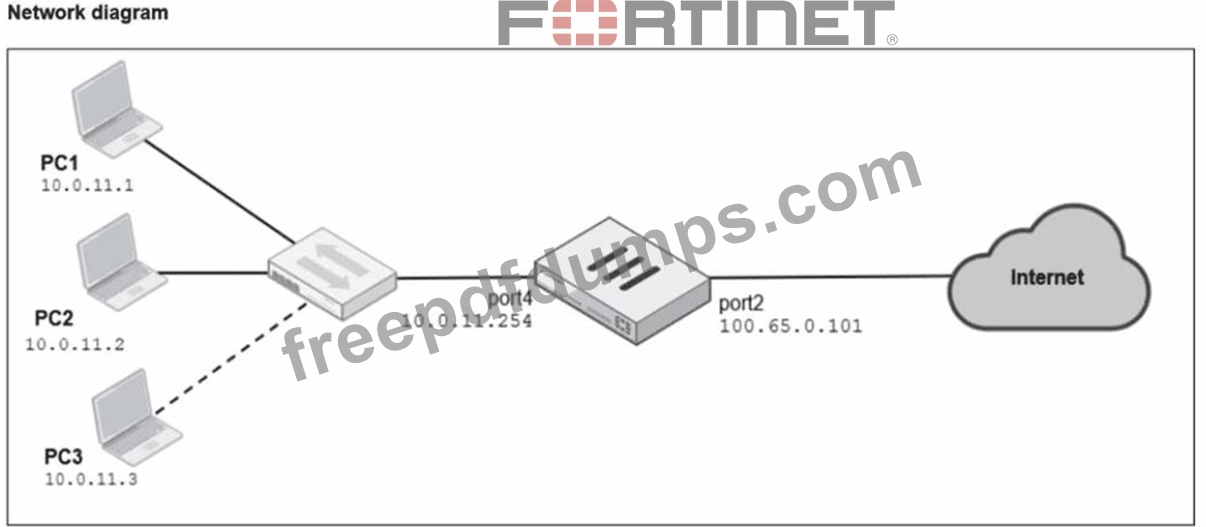
Refer to the exhibits. A diagram of a FortiGate device connected to the network, as well as the firewall policy and IP pool configuration on the FortiGate device are shown. Two PCs. PC1 and PC2, are connected behind FortiGate and can access the internet successfully. However, when the administrator adds a third PC to the network (PC3), the PC cannot connect to the internet. Based on the information shown in the exhibit, which two configuration options can the administrator use to fix the connectivity issue for PC3? (Choose two.)
Correct Answer: B,D
From the exhibits: The firewall policy has NAT enabled and is configured to Use Dynamic IP Pool. The selected IP pool (Internet-pool) is configured as: Type: One-to-One External IP Range: 100.65.0.110-100.65.0.111 (only two public IPs) PC1 and PC2 can access the internet because each one-to-one NAT mapping consumes one public IP from the pool. When PC3 is added, there is no third public IP available in the pool, so FortiGate cannot allocate a one-to-one mapping for PC3 and the session fails. FortiOS behavior here is standard: with one-to-one IP pools, the available pool size limits how many distinct internal sources can be translated concurrently (depending on allocation and sessions), and a pool with only two IPs will not reliably support three separate hosts needing translations. Therefore, the administrator can fix this in two valid ways: B . In the IP pool configuration, set end ip to 100.65.0.112. This expands the pool by adding an additional public IP address, making three public IPs available (.110, .111, .112), so PC3 can be assigned an address for one-to-one NAT. D . In the IP pool configuration, set type to overload. Changing the pool type to overload enables PAT (many-to-one), allowing multiple internal hosts (PC1, PC2, PC3) to share the pool address(es) using different source ports. This removes the "one public IP per internal host" limitation inherent to one-to-one pools. Why the other options are not correct: A . Multiple Interface Policies is unrelated to IP pool exhaustion and does not solve NAT allocation limits. C . match-vip affects VIP matching behavior for destination NAT/virtual IP usage and does not address the source NAT pool shortage causing PC3 to fail.
NSE4_FGT_AD-7.6 Exam Question 7
A network administrator enabled antivirus and selected an SSL inspection profile on a firewall policy. When downloading an EICAR test file through HTTP, FortiGate detects the virus and blocks the file. When downloading the same file through HTTPS, FortiGate does not detect the virus and does not block the file, allowing it to be downloaded. The administrator confirms that the traffic matches the configured firewall policy. What are two reasons for the failed virus detection by FortiGate? (Choose two answers)
Correct Answer: A,B
"The only security features you can apply using SSL certificate inspection mode are web filtering and application control... certificate inspection does not allow FortiGate to inspect the flow of encrypted data." "For antivirus or IPS control, you should use a deep-inspection profile." "Within the full SSL inspection profile, you can also specify which SSL sites, if any, you want to exempt from SSL inspection." Technical Deep Dive: The correct answers are A and B. A is correct because if the firewall policy uses certificate inspection, FortiGate can inspect certificate/SNI metadata only. It cannot decrypt the HTTPS payload, so the antivirus engine never sees the EICAR file contents. That means HTTPS malware scanning fails even though HTTP scanning works. B is also correct because if the destination site is exempt from SSL inspection, FortiGate intentionally skips decryption for that HTTPS session. Again, no payload decryption means no antivirus content scan. Why the others are wrong: C is not the likely reason here, especially for EICAR, which is a very small test file. D would usually cause browser certificate warnings or connection issues during deep inspection, not a clean download that bypasses AV inspection. Operationally, HTTPS antivirus requires this chain to be true: firewall policy match → SSL deep inspection active → site not exempted → AV profile applied. If either certificate-inspection is used or the site is exempted, FortiGate cannot inspect the encrypted file body.
NSE4_FGT_AD-7.6 Exam Question 8
When configuring firewall policies which of the following is true regarding the policy ID? (Choose two.)
Correct Answer: B,C
According to the FortiOS 7.6 Administration Guide, the firewall policy ID is a unique numerical identifier assigned to each policy for internal database tracking and management purposes. It is important to distinguish the policy ID from the policy sequence. While the FortiGate processes traffic based on a top-down approach (the sequence), the policy ID itself does not determine the order of execution (Statement A is incorrect). In FortiOS, once a policy is committed to the configuration, the policy ID cannot be modified (Statement B). If an administrator needs to change a policy ID, they must either delete and recreate the policy or use the clone command in the CLI to copy the settings to a new ID. Furthermore, the CLI provides a specific shortcut for policy creation: you can create a policy with ID 0 (Statement C). When the command edit 0 is used within the config firewall policy context, the FortiOS kernel automatically assigns the next available integer as the policy ID. This is a standard practice for efficient configuration via the command line. Statement D is incorrect because, while every policy must have an ID, the GUI automatically generates this value without requiring the user to manually provide or even see it during the initial creation process.
NSE4_FGT_AD-7.6 Exam Question 9
Refer to the exhibits. The exhibits show the application sensor configuration and the Excessive-Bandwidth and Apple filter details. Based on the configuration, what will happen to Apple FaceTime if there are only a few calls originating or incoming? (Choose one answer)
Correct Answer: B
According to the FortiOS 7.6 Administrator Study Guide, the Application Control engine processes traffic by evaluating the Application and Filter Overrides section first, using a top-down matching logic similar to firewall policies. In the provided exhibit, there are two override entries: Priority 1: A behavior-based filter for Excessive-Bandwidth with the action set to Block. Priority 2: A vendor-based filter for Apple with the action set to Monitor. The exhibit titled "Application override configuration" explicitly shows that Apple FaceTime is one of the signatures included within the Excessive-Bandwidth behavior filter. When the FortiGate inspects FaceTime traffic, it matches the first entry (Priority 1) because the signature belongs to the "Excessive-Bandwidth" group. Since the action for this priority is Block, the traffic is dropped immediately. The phrase "only a few calls" is a common exam distractor; in this context, the "Excessive-Bandwidth" filter refers to the classification of the application (as one that typically consumes high bandwidth) rather than a real-time measurement of the specific session's throughput. Because the engine stops searching once a match is found in the overrides, it never reaches the Priority 2 "Monitor" rule or the general Category settings.
NSE4_FGT_AD-7.6 Exam Question 10
What are two features of collector agent advanced mode? (Choose two.)
Correct Answer: B,D
"Also, advanced mode supports nested or inherited groups; that is, users can be members of subgroups that belong to monitored parent groups." "In advanced mode, you can configure FortiGate as an LDAP client and configure the group filters on FortiGate. You can also configure group filters on the collector agent." Collector Agent Advanced Mode provides deeper integration between FortiGate, LDAP, and Active Directory, compared to standard mode. Key features of Collector Agent Advanced Mode B). FortiGate can be configured as an LDAP client and group filters can be configured on FortiGate. Correct In advanced mode: FortiGate directly queries LDAP/AD User group filters are configured on FortiGate, not only on the Collector Agent This allows more flexible and scalable user/group-based policies D). Advanced mode supports nested or inherited groups. Correct Advanced mode supports: Nested AD groups Inherited group memberships This is one of the primary reasons advanced mode is used in complex AD environments Why the other options are incorrect A). Security profiles only to user groups Incorrect. Security profiles can be applied to users or groups, depending on policy configuration. C). Uses NetBIOS Domain\Username format Incorrect. NetBIOS naming is associated with standard mode Advanced mode typically uses LDAP DN-based identification