Which two statements about the FortiLink authorization process are true? (Choose two.)
Correct Answer: C,D
The FortiLink authorization process is an integral part of setting up FortiSwitch to be managed by FortiGate. The correct statements regarding the FortiLink authorization process are: C).A FortiLink frame is sent by FortiGate to FortiSwitch to complete the authorization.This is a part of the FortiLink protocol, where FortiGate communicates with the connected FortiSwitch to establish management and control. This frame initiates the configuration and management process, allowing FortiGate to effectively control the switch. D).FortiLink authorization sets the FortiSwitch management mode to FortiLink.Once authorized, the management mode of FortiSwitch is set to FortiLink, indicating that it is being managed via a FortiLink connection from a FortiGate appliance. This changes the operational mode of the switch to be under the control of the FortiGate for centralized management and policy application. References: Further details on the FortiLink setup and authorization process can be accessed through the FortiGate configuration guides available on theFortinet Documentation site.
NSE5_FSW_AD-7.6 Exam Question 7
How is traffic routed on FortiSwitch?
Correct Answer: D
Layer 3 routing can be configured on FortiSwitch, while managed by FortiGate (D): FortiSwitch, when managed by FortiGate, supports Layer 3 routing capabilities. This allows for routing between VLANs directly on the switch, enhancing network efficiency by reducing the need to pass traffic through higher network layers for inter-VLAN communication. This configuration enables more sophisticated network setups and efficient routing directly at the switch level.
NSE5_FSW_AD-7.6 Exam Question 8
What are two ways in which automatic MAC address quarantine works on FortiSwitch? (Choose two.)
Correct Answer: C,D
Reference: FortiSwitch 7.6 Study Guide, page 263
NSE5_FSW_AD-7.6 Exam Question 9
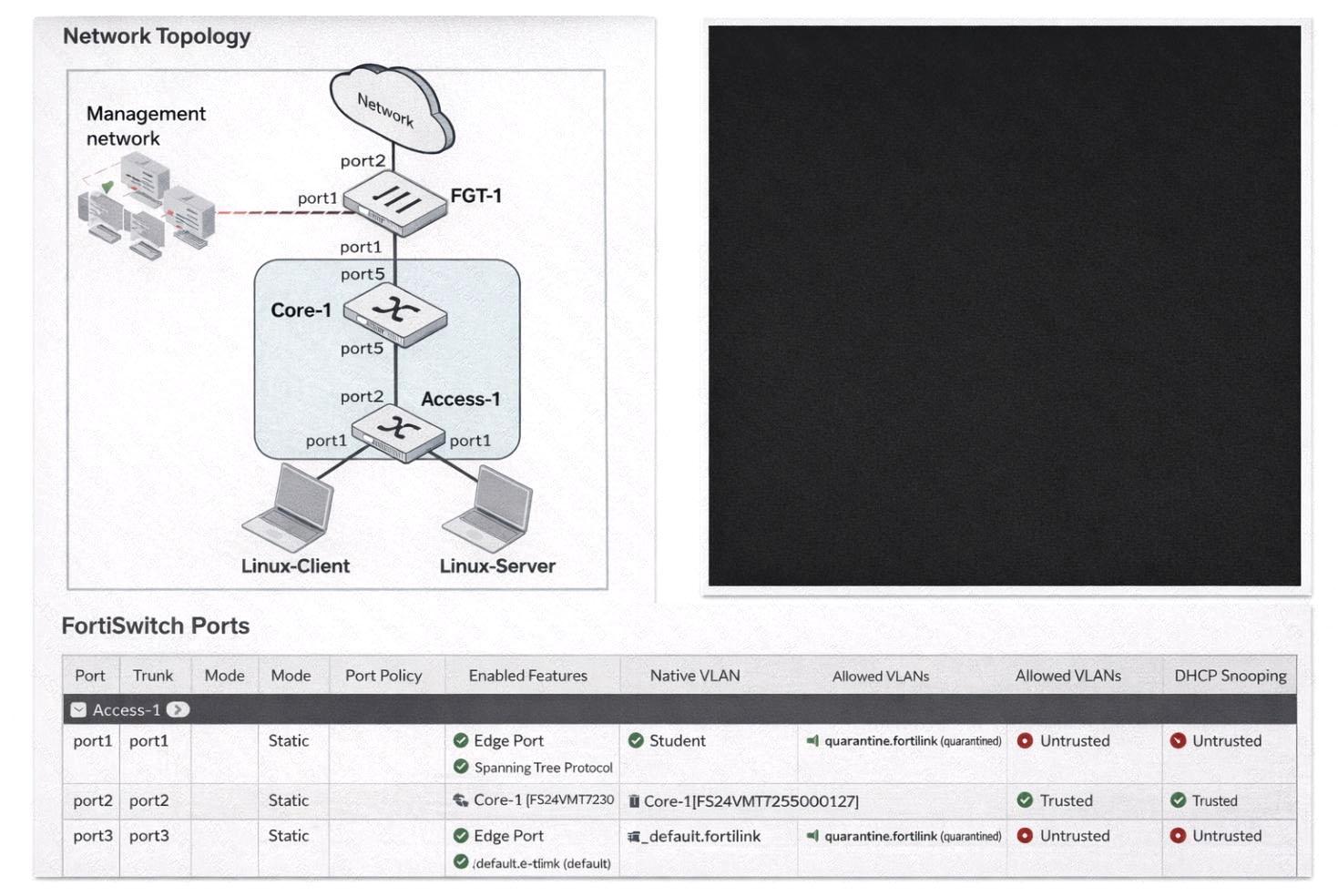
(Full question statement start from here) Refer to the exhibits. You enable Dynamic Host Configuration Protocol (DHCP) snooping on the VLAN,Student. The Linux-Client VM sends DHCP requests, and tcpdump confirms the broadcasts. However, the Linux-Server VM, acting as a DHCP server, receives no DHCP traffic. What is the most likely cause of this intra-VLAN traffic being blocked? (Choose one answer)
Correct Answer: B
In FortiSwitchOS 7.6,DHCP snoopingis a Layer 2 security feature that validates DHCP traffic and protects the LAN from rogue DHCP servers. The feature enforces atrust modelon switch ports: ports connected toward legitimate DHCP server infrastructure must be markedtrusted, while edge/access ports facing clients are typicallyuntrusted. When DHCP snooping is enabled on a VLAN (in this case,Student), FortiSwitch inspects DHCP messages and applies filtering rules based on port trust status. From the exhibit, bothport1(connected to the Linux-Server DHCP server) andport4(connected to the Linux- Client) showDHCP Snooping: Untrusted. In this configuration, the switch treats the DHCP server-facing port as untrusted and, by design, willblock DHCP server-originated messages(such as DHCPOFFER/DHCPACK) arriving on that interface. This prevents the DHCP handshake from completing and effectively stops DHCP from functioning across that VLAN segment. Operationally, this is commonly observed as "no DHCP traffic" at the server/application layer because the exchange cannot progress normally when the server side is not trusted. Option C is incorrect because the client-facing port is expected to be untrusted. Options A and D do not align with the exhibit: the ports are already placed in the Student VLAN as native VLAN, so the primary issue is the DHCP snooping trust role. Therefore, the most likely cause is thatport1 is configured as an untrusted port(it must be trusted for a DHCP server), makingBthe correct answer.
NSE5_FSW_AD-7.6 Exam Question 10
(Full question statement start from here) You enable Dynamic Host Configuration Protocol (DHCP) snooping on a VLAN and configure a FortiSwitch port astrustedfor DHCP snooping. What additional step is required to configure the port as trusted for Dynamic ARP Inspection (DAI)? (Choose one answer)
Correct Answer: B
In FortiSwitchOS 7.6,Dynamic ARP Inspection (DAI)is tightly integrated withDHCP snoopingto provide Layer 2 protection against ARP spoofing and man-in-the-middle attacks. DAI relies on theDHCP snooping binding table, which contains trusted IP-to-MAC-to-port mappings learned from legitimate DHCP transactions. Because of this dependency, the trust model for DAI is directly inherited from DHCP snooping. According to the FortiSwitchOS 7.6 Administrator Guide, when a switch port is configured astrusted for DHCP snooping, that same port isautomatically treated as trusted by DAI. No additional configuration is required. This implicit trust relationship exists because trusted DHCP snooping ports are assumed to be connected to legitimate infrastructure devices such as DHCP servers, routers, or upstream network devices that must be allowed to send valid ARP replies. On untrusted ports, DAI inspects ARP packets and validates them against the DHCP snooping database. If an ARP packet does not match an existing binding, it is dropped. On trusted ports, ARP packets bypass DAI inspection to ensure normal network operation and to avoid blocking valid infrastructure traffic. The other options are incorrect. There is no separate CLI command required to trust a port for DAI (Option A). IP Source Guard (Option C) is another Layer 2 security feature that also depends on DHCP snooping but is not required to establish DAI trust. Static MAC learning (Option D) is unrelated to DAI trust behavior. Therefore, once a port is configured as trusted for DHCP snooping,DAI implicitly trusts the port, making Option Bthe correct and fully verified answer based on FortiSwitchOS 7.6 documentation.