

CKS Exam Question 26
Cluster: qa-cluster
Master node: master Worker node: worker1
You can switch the cluster/configuration context using the following command:
[desk@cli] $ kubectl config use-context qa-cluster
Task:
Create a NetworkPolicy named restricted-policy to restrict access to Pod product running in namespace dev.
Only allow the following Pods to connect to Pod products-service:
1. Pods in the namespace qa
2. Pods with label environment: stage, in any namespace
Master node: master Worker node: worker1
You can switch the cluster/configuration context using the following command:
[desk@cli] $ kubectl config use-context qa-cluster
Task:
Create a NetworkPolicy named restricted-policy to restrict access to Pod product running in namespace dev.
Only allow the following Pods to connect to Pod products-service:
1. Pods in the namespace qa
2. Pods with label environment: stage, in any namespace
CKS Exam Question 27
You can switch the cluster/configuration context using the following command: [desk@cli] $ kubectl config use-context qa Context: A pod fails to run because of an incorrectly specified ServiceAccount Task: Create a new service account named backend-qa in an existing namespace qa, which must not have access to any secret. Edit the frontend pod yaml to use backend-qa service account Note: You can find the frontend pod yaml at /home/cert_masters/frontend-pod.yaml
CKS Exam Question 28
SIMULATION
Secrets stored in the etcd is not secure at rest, you can use the etcdctl command utility to find the secret value for e.g:- ETCDCTL_API=3 etcdctl get /registry/secrets/default/cks-secret --cacert="ca.crt" --cert="server.crt" --key="server.key" Output
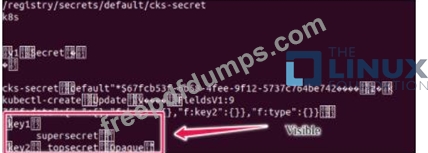
Using the Encryption Configuration, Create the manifest, which secures the resource secrets using the provider AES-CBC and identity, to encrypt the secret-data at rest and ensure all secrets are encrypted with the new configuration.
Secrets stored in the etcd is not secure at rest, you can use the etcdctl command utility to find the secret value for e.g:- ETCDCTL_API=3 etcdctl get /registry/secrets/default/cks-secret --cacert="ca.crt" --cert="server.crt" --key="server.key" Output
Using the Encryption Configuration, Create the manifest, which secures the resource secrets using the provider AES-CBC and identity, to encrypt the secret-data at rest and ensure all secrets are encrypted with the new configuration.
CKS Exam Question 29
SIMULATION
Create a Pod name Nginx-pod inside the namespace testing, Create a service for the Nginx-pod named nginx-svc, using the ingress of your choice, run the ingress on tls, secure port.
Create a Pod name Nginx-pod inside the namespace testing, Create a service for the Nginx-pod named nginx-svc, using the ingress of your choice, run the ingress on tls, secure port.
CKS Exam Question 30
Create a PSP that will prevent the creation of privileged pods in the namespace.
Create a new PodSecurityPolicy named prevent-privileged-policy which prevents the creation of privileged pods.
Create a new ServiceAccount named psp-sa in the namespace default.
Create a new ClusterRole named prevent-role, which uses the newly created Pod Security Policy prevent-privileged-policy.
Create a new ClusterRoleBinding named prevent-role-binding, which binds the created ClusterRole prevent-role to the created SA psp-sa.
Also, Check the Configuration is working or not by trying to Create a Privileged pod, it should get failed.
Create a new PodSecurityPolicy named prevent-privileged-policy which prevents the creation of privileged pods.
Create a new ServiceAccount named psp-sa in the namespace default.
Create a new ClusterRole named prevent-role, which uses the newly created Pod Security Policy prevent-privileged-policy.
Create a new ClusterRoleBinding named prevent-role-binding, which binds the created ClusterRole prevent-role to the created SA psp-sa.
Also, Check the Configuration is working or not by trying to Create a Privileged pod, it should get failed.