

AZ-500 Exam Question 16
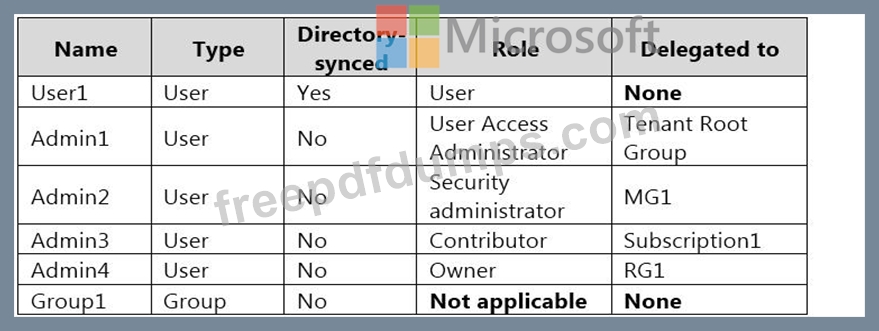
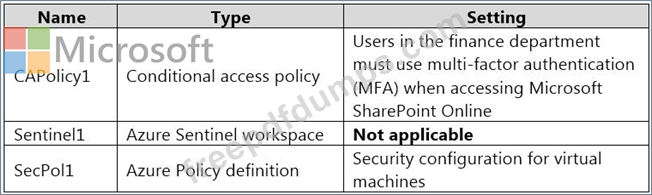
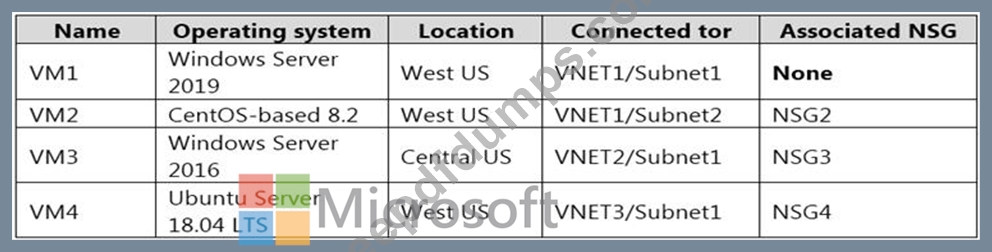
You are evaluating the security of VM1, VM2, and VM3 in Sub2.
For each of the following statements, select Yes if the statement is true. Otherwise, select No.
NOTE: Each correct selection is worth one point.

For each of the following statements, select Yes if the statement is true. Otherwise, select No.
NOTE: Each correct selection is worth one point.






AZ-500 Exam Question 17
Your network contains an on-premises Active Directory domain named adatum.com that syncs to Azure Active Directory (Azure AD).
The Azure AD tenant contains the users shown in the following table.
You configure the Authentication methods - Password Protection settings for adatum.com as shown in the following exhibit.

For each of the following statements, select Yes if the statement is true. Otherwise, select No.
NOTE: Each correct selection is worth one point.

The Azure AD tenant contains the users shown in the following table.
You configure the Authentication methods - Password Protection settings for adatum.com as shown in the following exhibit.
For each of the following statements, select Yes if the statement is true. Otherwise, select No.
NOTE: Each correct selection is worth one point.

AZ-500 Exam Question 18
On Monday, you configure an email notification in Azure Security Center to email notifications to [email protected].
On Tuesday, Security Center generates the security alerts shown in the following table.

How many email notifications will [email protected] receive on Tuesday? To answer, select the appropriate options in the answer area.
NOTE: Each correct selection is worth one point.

On Tuesday, Security Center generates the security alerts shown in the following table.
How many email notifications will [email protected] receive on Tuesday? To answer, select the appropriate options in the answer area.
NOTE: Each correct selection is worth one point.

AZ-500 Exam Question 19
You have the Azure Information Protection conditions shown in the following table.

You need to identify how Azure Information Protection will label files.
What should you identify? To answer, select the appropriate options in the answer area.
NOTE: Each correct selection is worth one point.

You need to identify how Azure Information Protection will label files.
What should you identify? To answer, select the appropriate options in the answer area.
NOTE: Each correct selection is worth one point.


AZ-500 Exam Question 20
Use the following login credentials as needed:
To enter your username, place your cursor in the Sign in box and click on the username below.
To enter your password, place your cursor in the Enter password box and click on the password below.
Azure Username: [email protected]
Azure Password: Ag1Bh9!#Bd
The following information is for technical support purposes only:
Lab Instance: 10598168


You need to email an alert to a user named [email protected] if the average CPU usage of a virtual machine named VM1 is greater than 70 percent for a period of 15 minutes.
To complete this task, sign in to the Azure portal.
To enter your username, place your cursor in the Sign in box and click on the username below.
To enter your password, place your cursor in the Enter password box and click on the password below.
Azure Username: [email protected]
Azure Password: Ag1Bh9!#Bd
The following information is for technical support purposes only:
Lab Instance: 10598168
You need to email an alert to a user named [email protected] if the average CPU usage of a virtual machine named VM1 is greater than 70 percent for a period of 15 minutes.
To complete this task, sign in to the Azure portal.
