

MS-101 Exam Question 41
You have a Microsoft 365 subscription.
You have the devices shown in the following table.
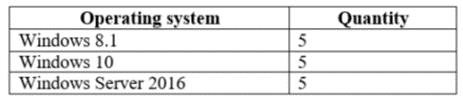
You need to onboard the devices to Windows Defender Advanced Threat Protection (ATP). The solution must avoid installing software on the devices whenever possible.
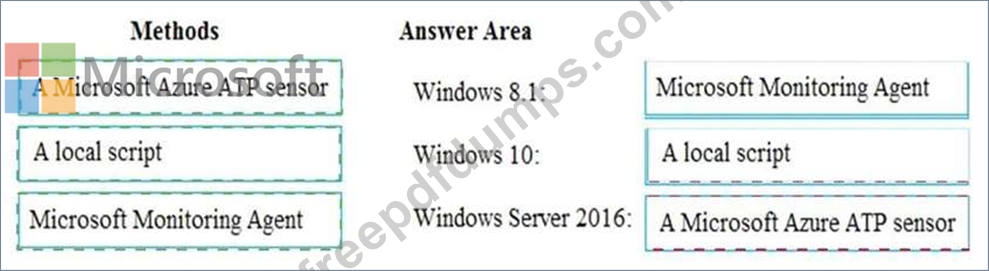
Which onboarding method should you use for each operating system? To answer, drag the appropriate methods to the correct operating systems. Each method may be used once, more than once, or not at all. You may need to drag the split bar between panes or scroll to view content.
NOTE: Each correct selection is worth one point.

You have the devices shown in the following table.
You need to onboard the devices to Windows Defender Advanced Threat Protection (ATP). The solution must avoid installing software on the devices whenever possible.
Which onboarding method should you use for each operating system? To answer, drag the appropriate methods to the correct operating systems. Each method may be used once, more than once, or not at all. You may need to drag the split bar between panes or scroll to view content.
NOTE: Each correct selection is worth one point.
MS-101 Exam Question 42
You have a Microsoft 365 subscription that contains the users in the following table.

In Microsoft Endpoint Manager, you create two device type restrictions that have the settings shown in the following table.

In Microsoft Endpoint Manager, you create three device limit restrictions that have the settings shown in the following table.

For each of the following statements, select Yes if the statement is true. Otherwise, select No.
NOTE: Each correct selection is worth one point.

In Microsoft Endpoint Manager, you create two device type restrictions that have the settings shown in the following table.
In Microsoft Endpoint Manager, you create three device limit restrictions that have the settings shown in the following table.
For each of the following statements, select Yes if the statement is true. Otherwise, select No.
NOTE: Each correct selection is worth one point.

MS-101 Exam Question 43
You have a Microsoft 365 subscription that contains an Azure Active Directory (Azure AD) tenant named contoso.com. The tenant contains the users shown in the following table.

You create and assign a data loss prevention (DLP) policy named Policy1. Policy1 is configured to prevent documents that contain Personally Identifiable Information (PII) from being emailed to users outside your organization.
To which users can User1 send documents that contain PII?
You create and assign a data loss prevention (DLP) policy named Policy1. Policy1 is configured to prevent documents that contain Personally Identifiable Information (PII) from being emailed to users outside your organization.
To which users can User1 send documents that contain PII?
MS-101 Exam Question 44
Your company has a Microsoft 365 subscription that uses an Azure Active Directory (Azure AD) tenant named contoso.com.
A user named User1 is a member of a dynamic group named Group1.
User1 reports that he cannot access documents shared to Group1.
You discover that User1 is no longer a member of Group1.
You suspect that an administrator made a change that caused User1 to be removed from Group1.
You need to identify which administrator made the change.
Which audit log activity should you search in the Security & Compliance admin center?
A user named User1 is a member of a dynamic group named Group1.
User1 reports that he cannot access documents shared to Group1.
You discover that User1 is no longer a member of Group1.
You suspect that an administrator made a change that caused User1 to be removed from Group1.
You need to identify which administrator made the change.
Which audit log activity should you search in the Security & Compliance admin center?
MS-101 Exam Question 45
Note: This question is part of a series of questions that present the same scenario. Each question in the series contains a unique solution that might meet the stated goals. Some question sets might have more than one correct solution, while others might not have a correct solution.
After you answer a question in this section, you will NOT be able to return to it. As a result, these questions will not appear in the review screen.
You have a Microsoft 365 E5 subscription.
You create an account for a new security administrator named SecAdmin1.
You need to ensure that SecAdmin1 can manage Microsoft Defender for Office 365 settings and policies for Microsoft Teams, SharePoint, and OneDrive.
Solution: From the Microsoft 365 admin center, you assign SecAdmin1 the Exchange admin role.
Does this meet the goal?
After you answer a question in this section, you will NOT be able to return to it. As a result, these questions will not appear in the review screen.
You have a Microsoft 365 E5 subscription.
You create an account for a new security administrator named SecAdmin1.
You need to ensure that SecAdmin1 can manage Microsoft Defender for Office 365 settings and policies for Microsoft Teams, SharePoint, and OneDrive.
Solution: From the Microsoft 365 admin center, you assign SecAdmin1 the Exchange admin role.
Does this meet the goal?