

MS-101 Exam Question 21
Your company has a Microsoft 365 subscription that uses an Azure Active Directory (Azure AD) tenant named contoso.com. The tenant contains computers that run Windows 10 Enterprise and are managed by using Microsoft Intune. The computers are configured as shown in the following table.

You plan to implement Windows Defender Application Guard for contoso.com.
You need to identify on which two Windows 10 computers Windows Defender Application Guard can be installed.
Which two computers should you identify? Each correct answer presents part of the solution.
NOTE: Each correct selection is worth one point.
You plan to implement Windows Defender Application Guard for contoso.com.
You need to identify on which two Windows 10 computers Windows Defender Application Guard can be installed.
Which two computers should you identify? Each correct answer presents part of the solution.
NOTE: Each correct selection is worth one point.
MS-101 Exam Question 22
Note: This question is part of a series of questions that present the same scenario. Each question in the series contains a unique solution that might meet the stated goals. Some question sets might have more than one correct solution, while others might not have a correct solution.
After you answer a question in this section, you will NOT be able to return to it. As a result, these questions will not appear in the review screen.
Your network contains an on-premises Active Directory domain. The domain contains 2,000 computers that run Windows 8.1 and have applications installed as shown in the following table.

You enroll all the computers in Upgrade Readiness.
You need to ensure that App1 and App2 have an UpgradeDecision status of Ready to upgrade.
Solution: You set the ReadyForWindows status of App2 to Highly adopted.
Does this meet the goal?
After you answer a question in this section, you will NOT be able to return to it. As a result, these questions will not appear in the review screen.
Your network contains an on-premises Active Directory domain. The domain contains 2,000 computers that run Windows 8.1 and have applications installed as shown in the following table.
You enroll all the computers in Upgrade Readiness.
You need to ensure that App1 and App2 have an UpgradeDecision status of Ready to upgrade.
Solution: You set the ReadyForWindows status of App2 to Highly adopted.
Does this meet the goal?
MS-101 Exam Question 23
You have a Microsoft 365 subscription.
You plan to connect to Microsoft Exchange Online PowerShell and run the following cmdlets:
* Search-MailboxAuditLog
* Test-ClientAccessRule
* Set-GroupMailbox
* Get-Mailbox
Which cmdlet will generate an entry in the Microsoft Office 365 audit log?
You plan to connect to Microsoft Exchange Online PowerShell and run the following cmdlets:
* Search-MailboxAuditLog
* Test-ClientAccessRule
* Set-GroupMailbox
* Get-Mailbox
Which cmdlet will generate an entry in the Microsoft Office 365 audit log?
MS-101 Exam Question 24
You have a Microsoft Azure Activity Directory (Azure AD) tenant contains the users shown in the following table.

Group3 is a member of Group1.
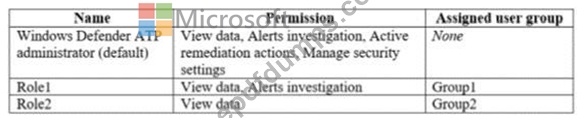
Your company uses Windows Defender Advanced Threat Protection (ATP). Windows Defender ATP contains the roles shown in the following table.
Windows Defender ATP contains the device groups shown in the following table.

For each of the following statements, select Yes if the statement is true. Otherwise, select No.
NOTE: Each correct selection is worth one point.

Group3 is a member of Group1.
Your company uses Windows Defender Advanced Threat Protection (ATP). Windows Defender ATP contains the roles shown in the following table.
Windows Defender ATP contains the device groups shown in the following table.
For each of the following statements, select Yes if the statement is true. Otherwise, select No.
NOTE: Each correct selection is worth one point.


MS-101 Exam Question 25
You have a Microsoft 365 subscription that uses a default domain named contoso.com.
Three files were created on February 1, 2019, as shown in the following table.

On March 1, 2019, you create two retention labels named Label1 and Label2.
The settings for Lable1 are configured as shown in the Label1 exhibit. (Click the Label1 tab.)

The settings for Lable2 are configured as shown in the Label2 exhibit. (Click the Label2 tab.)

You apply the retention labels to Exchange email, SharePoint sites, and OneDrive accounts.
For each of the following statements, select Yes if the statement is true. Otherwise, select No.
NOTE: Each correct selection is worth one point.

Three files were created on February 1, 2019, as shown in the following table.
On March 1, 2019, you create two retention labels named Label1 and Label2.
The settings for Lable1 are configured as shown in the Label1 exhibit. (Click the Label1 tab.)
The settings for Lable2 are configured as shown in the Label2 exhibit. (Click the Label2 tab.)
You apply the retention labels to Exchange email, SharePoint sites, and OneDrive accounts.
For each of the following statements, select Yes if the statement is true. Otherwise, select No.
NOTE: Each correct selection is worth one point.

