MS-101 Exam Question 31
Your company has a Microsoft 365 E5 subscription.
Users in the research department work with sensitive data.
You need to prevent the research department users from accessing potentially unsafe websites by using hyperlinks embedded in email messages and documents. Users in other departments must not be restricted.
What should you do from the Security & Compliance admin center?
Users in the research department work with sensitive data.
You need to prevent the research department users from accessing potentially unsafe websites by using hyperlinks embedded in email messages and documents. Users in other departments must not be restricted.
What should you do from the Security & Compliance admin center?
MS-101 Exam Question 32
You have a Microsoft Azure Active Directory (Azure AD) tenant named contoso.com.
A user named User1 has files on a Windows 10 device as shown in the following table.

In Azure Information Protection, you create a label named Label1 that is configured to apply automatically.
Label1 is configured as shown in the following exhibit.

For each of the following statements, select Yes if the statement is true. Otherwise, select No.
NOTE: Each correct selection is worth one point.

A user named User1 has files on a Windows 10 device as shown in the following table.
In Azure Information Protection, you create a label named Label1 that is configured to apply automatically.
Label1 is configured as shown in the following exhibit.
For each of the following statements, select Yes if the statement is true. Otherwise, select No.
NOTE: Each correct selection is worth one point.


MS-101 Exam Question 33
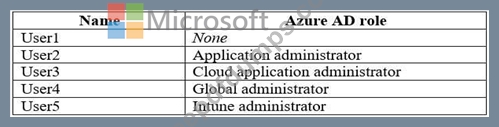
You have the Microsoft Azure Active Directory (Azure AD) users shown in the following table.

Your company uses Microsoft Intune.
Several devices are enrolled in Intune as shown in the following table.

You create a conditional access policy that has the following settings:
The Assignments settings are configured as follows:
* Users and groups: Group1
* Cloud apps: Microsoft Office 365 Exchange Online
* Conditions: Include All device state, exclude Device marked as compliant Access controls is set to Block access.
For each of the following statements, select Yes if the statement is true. Otherwise, select No.
NOTE: Each correct selection is worth one point.

Your company uses Microsoft Intune.
Several devices are enrolled in Intune as shown in the following table.
You create a conditional access policy that has the following settings:
The Assignments settings are configured as follows:
* Users and groups: Group1
* Cloud apps: Microsoft Office 365 Exchange Online
* Conditions: Include All device state, exclude Device marked as compliant Access controls is set to Block access.
For each of the following statements, select Yes if the statement is true. Otherwise, select No.
NOTE: Each correct selection is worth one point.


MS-101 Exam Question 34
You need to meet the technical requirement for log analysis.
What is the minimum number of data sources and log collectors you should create from Microsoft Cloud App Security? To answer, select the appropriate options in the answer area.
NOTE: Each correct selection is worth one point.

What is the minimum number of data sources and log collectors you should create from Microsoft Cloud App Security? To answer, select the appropriate options in the answer area.
NOTE: Each correct selection is worth one point.

MS-101 Exam Question 35
HOTSPOT
You have a Microsoft 365 E5 tenant that contains a Microsoft SharePoint Online site named Site1. Site1 contains the files shown in the following table.

You create a sensitivity label named Sensitivity1 and an auto-label policy that has the following configurations:
* Name: AutoLabel1
* Label to auto-apply: Sensitivity1
* Rules for SharePoint Online sites: Rule1-SPO
* Choose locations where you want to apply the label: Site1
Rule1-SPO is configured as shown in the following exhibit.
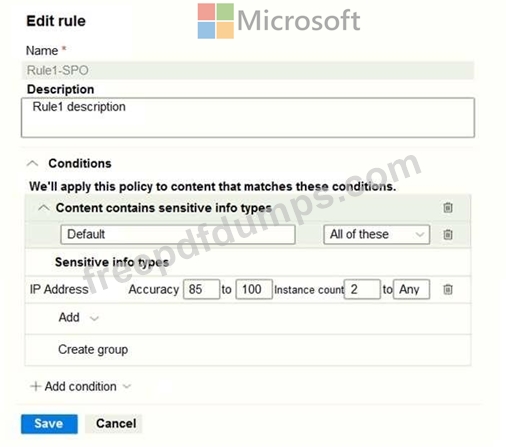
For each of the following statements, select Yes if the statement is true. Otherwise, select No.
NOTE: Each correct selection is worth one point.
Hot Area:

You have a Microsoft 365 E5 tenant that contains a Microsoft SharePoint Online site named Site1. Site1 contains the files shown in the following table.
You create a sensitivity label named Sensitivity1 and an auto-label policy that has the following configurations:
* Name: AutoLabel1
* Label to auto-apply: Sensitivity1
* Rules for SharePoint Online sites: Rule1-SPO
* Choose locations where you want to apply the label: Site1
Rule1-SPO is configured as shown in the following exhibit.
For each of the following statements, select Yes if the statement is true. Otherwise, select No.
NOTE: Each correct selection is worth one point.
Hot Area: