

MS-102 Exam Question 6
You have a Microsoft 365 subscription and use Microsoft Defender for Office 365.
You need to recommend a solution to educate users on topics that relate to social engineering risks. The users must receive a weekly reminder to complete a learning task.
What should you use in the Microsoft Defender portal?
You need to recommend a solution to educate users on topics that relate to social engineering risks. The users must receive a weekly reminder to complete a learning task.
What should you use in the Microsoft Defender portal?
MS-102 Exam Question 7
You need to create the DLP policy to meet the technical requirements.
What should you configure first?
What should you configure first?
MS-102 Exam Question 8
You have a Microsoft 365 E5 subscription that contains a Microsoft SharePoint site named Sitel. Site!
contains the files shown in the following table.

You have a data loss prevention (DLP) policy named DLP1 that has the advanced DLP rules shown in the following table.

You apply DLP1 to Site1.
Which policy tip is displayed for each file? To answer, select the appropriate options in the answer area.
NOTE: Each correct selection is worth one point.

contains the files shown in the following table.
You have a data loss prevention (DLP) policy named DLP1 that has the advanced DLP rules shown in the following table.
You apply DLP1 to Site1.
Which policy tip is displayed for each file? To answer, select the appropriate options in the answer area.
NOTE: Each correct selection is worth one point.


MS-102 Exam Question 9
You have a Microsoft 365 ES subscription that has three auto retention policies as show in the following exhibit.

Use the drop-down menus to select the answer choice that completes each statement based on the information presented in the graphic NOTE Each correct selection is worth one point.

Use the drop-down menus to select the answer choice that completes each statement based on the information presented in the graphic NOTE Each correct selection is worth one point.


MS-102 Exam Question 10
Note: This question is part of a series of questions that present the same scenario. Each question in the series contains a unique solution that might meet the stated goals. Some question sets might have more than one correct solution, while others might not have a correct solution.
After you answer a question in this section, you will NOT be able to return to it. As a result, these questions will not appear in the review screen.
Your network contains an on-premises Active Directory domain named contoso.com. The domain contains the users shown in the following table.
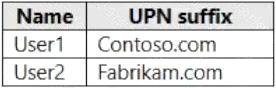
The domain syncs to an Azure AD tenant named contoso.com as shown in the exhibit. (Click the Exhibit tab.)

User2 fails to authenticate to Azure AD when signing in as [email protected].
You need to ensure that User2 can access the resources in Azure AD.
Solution: From the on-premises Active Directory domain, you assign User2 the Allow logon locally user right. You instruct User2 to sign in as [email protected].
Does this meet the goal?
After you answer a question in this section, you will NOT be able to return to it. As a result, these questions will not appear in the review screen.
Your network contains an on-premises Active Directory domain named contoso.com. The domain contains the users shown in the following table.
The domain syncs to an Azure AD tenant named contoso.com as shown in the exhibit. (Click the Exhibit tab.)
User2 fails to authenticate to Azure AD when signing in as [email protected].
You need to ensure that User2 can access the resources in Azure AD.
Solution: From the on-premises Active Directory domain, you assign User2 the Allow logon locally user right. You instruct User2 to sign in as [email protected].
Does this meet the goal?