

SC-400 Exam Question 36
SIMULATION
Use the following login credentials as needed:
To enter your username, place your cursor in the Sign in box and click on the username below.
To enter your password, place your cursor in the Enter password box and click on the password below.
Microsoft 365 Username: [email protected]
Microsoft 365 Password: **********
If the Microsoft 365 portal does not load successfully in the browser, press CTRL-K to reload the portal in a new browser tab.
The following information is for technical support purposes only:
Lab Instance: 12345678
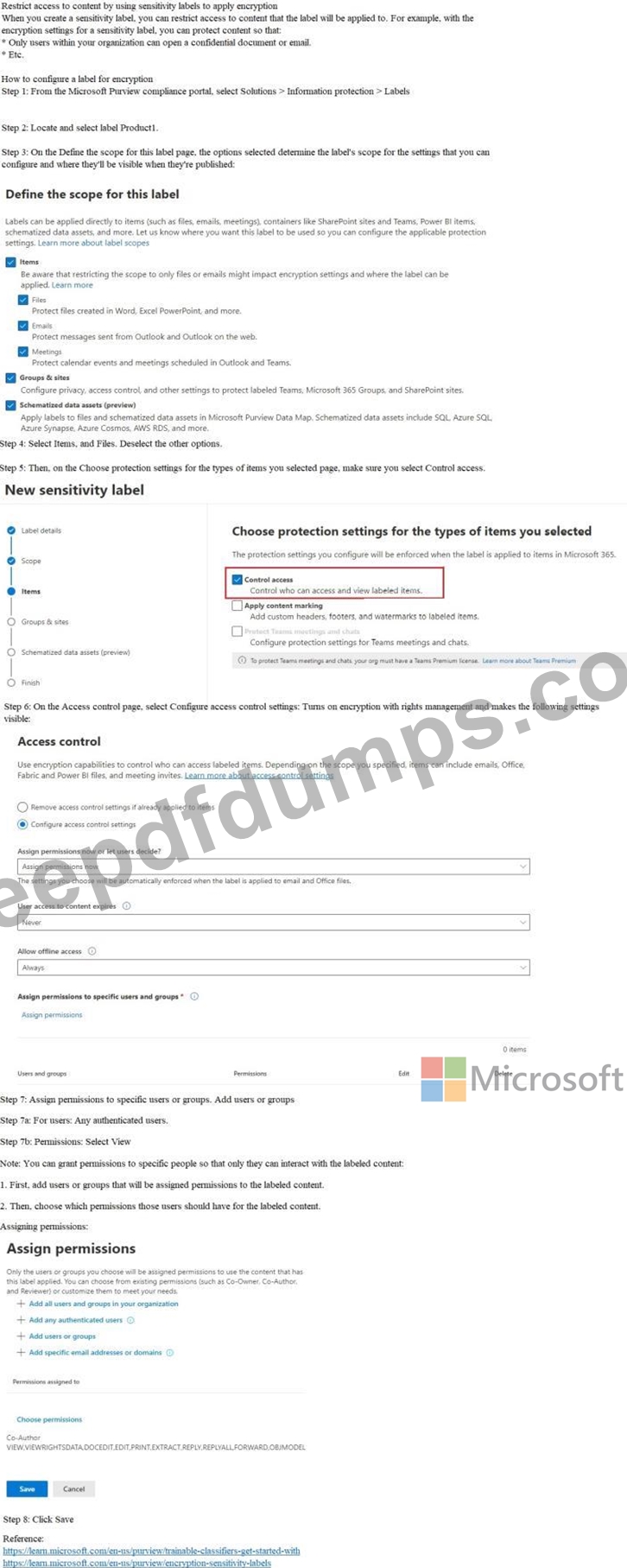
You need to provide users with the ability to manually classify files that contain product information that are stored in SharePoint Online sites. The solution must meet the following requirements:
- The users must be able to apply a classification of Product1 to the
files.
- Any authenticated user must be able to open files classified as
Product1.
- Files classified as Product1 must be encrypted.
To complete this task, sign in to the appropriate admin center.
Use the following login credentials as needed:
To enter your username, place your cursor in the Sign in box and click on the username below.
To enter your password, place your cursor in the Enter password box and click on the password below.
Microsoft 365 Username: [email protected]
Microsoft 365 Password: **********
If the Microsoft 365 portal does not load successfully in the browser, press CTRL-K to reload the portal in a new browser tab.
The following information is for technical support purposes only:
Lab Instance: 12345678
You need to provide users with the ability to manually classify files that contain product information that are stored in SharePoint Online sites. The solution must meet the following requirements:
- The users must be able to apply a classification of Product1 to the
files.
- Any authenticated user must be able to open files classified as
Product1.
- Files classified as Product1 must be encrypted.
To complete this task, sign in to the appropriate admin center.
SC-400 Exam Question 37
You have a Microsoft SharePoint Online site named Site1 that contains the files shown in the following table.

You have a data loss prevention (DLP) policy named DLP1 that has the advanced DLP rules shown in the following table.
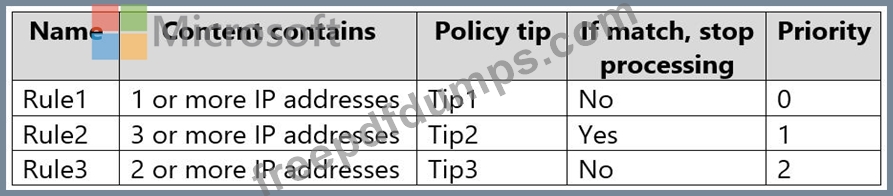
You apply DLP1 to Site1.
Which policy tips will appear for File2?
You have a data loss prevention (DLP) policy named DLP1 that has the advanced DLP rules shown in the following table.
You apply DLP1 to Site1.
Which policy tips will appear for File2?
SC-400 Exam Question 38
Hotspot Question
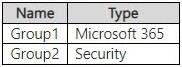
You have a Microsoft 365 E5 subscription that contains the groups shown in the following table.
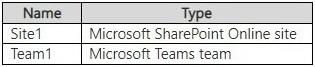
The subscription contains the resources shown in the following table.
You create a sensitivity label named Label 1.
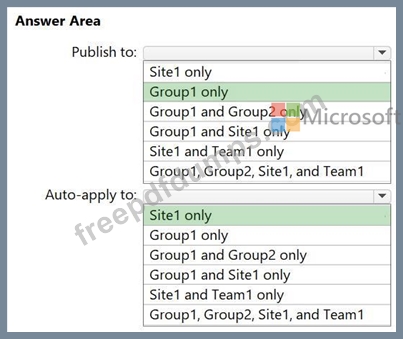
You need to publish Label1 and have the label apply automatically.
To what can you publish Label1, and to what can Label1 be auto-applied? To answer, select the appropriate options in the answer area.
NOTE: Each correct selection is worth one point.

You have a Microsoft 365 E5 subscription that contains the groups shown in the following table.
The subscription contains the resources shown in the following table.
You create a sensitivity label named Label 1.
You need to publish Label1 and have the label apply automatically.
To what can you publish Label1, and to what can Label1 be auto-applied? To answer, select the appropriate options in the answer area.
NOTE: Each correct selection is worth one point.
SC-400 Exam Question 39
Case Study 2 - Contoso, Ltd
Overview
Contoso, Ltd. is a consulting company that has a main office in Montreal and three branch offices in Seattle, Boston, and Johannesburg.
Existing Environment
Microsoft 365 Environment
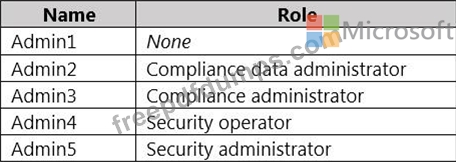
Contoso has a Microsoft 365 E5 tenant. The tenant contains the administrative user accounts shown in the following table.
Users store data in the following locations:
SharePoint sites
OneDrive accounts
Exchange email
Exchange public folders
Teams chats
Teams channel messages
When users in the research department create documents, they must add a 10-digit project code to each document. Project codes that start with the digits 999 are confidential.
SharePoint Online Environment
Contoso has four Microsoft SharePoint Online sites named Site1, Site2, Site3, and Site4.
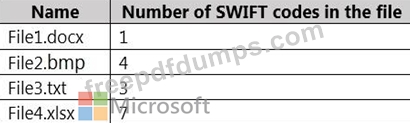
Site2 contains the files shown in the following table.
Two users named User1 and User2 are assigned roles for Site2 as shown in the following table.

Site3 stores documents related to the company's projects. The documents are organized in a folder hierarchy based on the project.
Site4 has the following two retention policies applied:
Name: Site4RetentionPolicy1
- Locations to apply the policy: Site4
- Delete items older than: 2 years
- Delete content based on: When items were created
Name: Site4RetentionPolicy2
- Locations to apply the policy: Site4
- Retain items for a specific period: 4 years
- Start the retention period based on: When items were created
- At the end of the retention period: Do nothing
Problem Statements
Management at Contoso is concerned about data leaks. On several occasions, confidential research department documents were leaked.
Requirements
Planned Changes
Contoso plans to create the following data loss prevention (DLP) policy:
Name: DLPpolicy1
Locations to apply the policy: Site2
Conditions:
- Content contains any of these sensitive info types: SWIFT Code
- Instance count: 2 to any
Actions: Restrict access to the content
Technical Requirements
Contoso must meet the following technical requirements:
All administrative users must be able to review DLP reports.
Whenever possible, the principle of least privilege must be used.
For all users, all Microsoft 365 data must be retained for at least one year.
Confidential documents must be detected and protected by using Microsoft 365.
Site1 documents that include credit card numbers must be labeled automatically.
All administrative users must be able to create Microsoft 365 sensitivity labels.
After a project is complete, the documents in Site3 that relate to the project must be retained for
10 years.
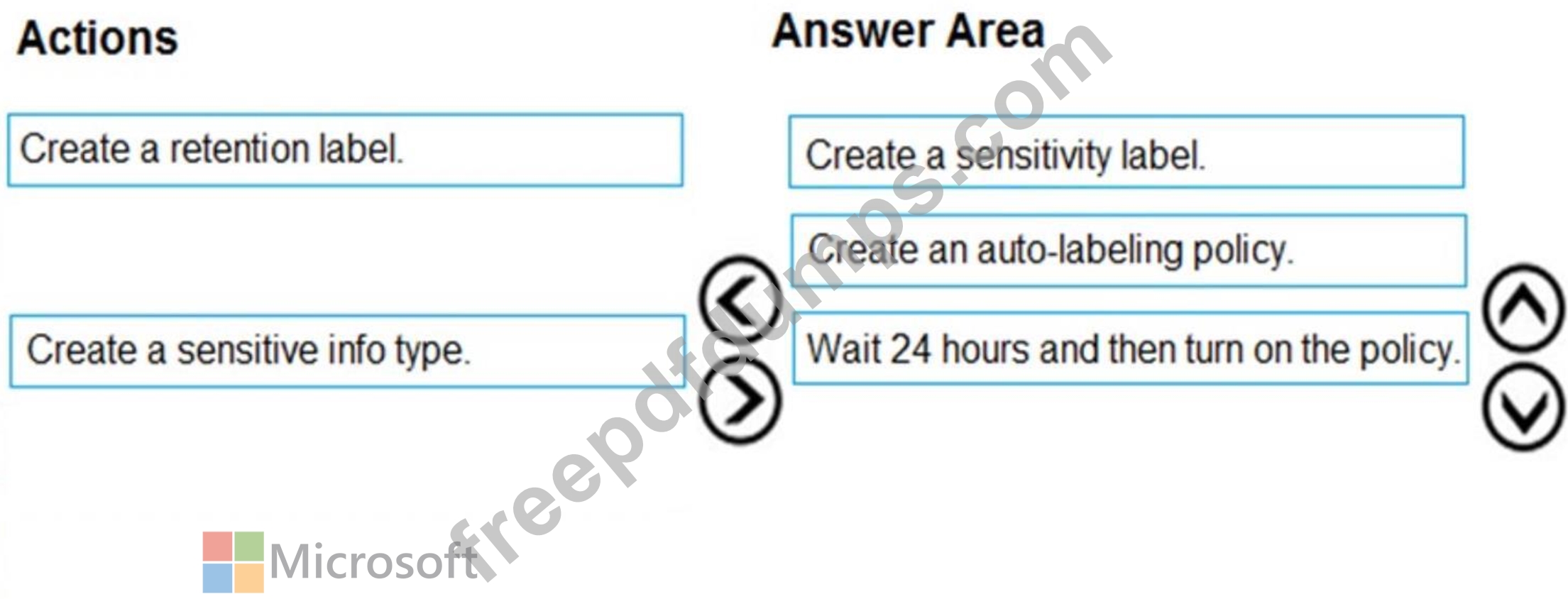
Drag and Drop Question
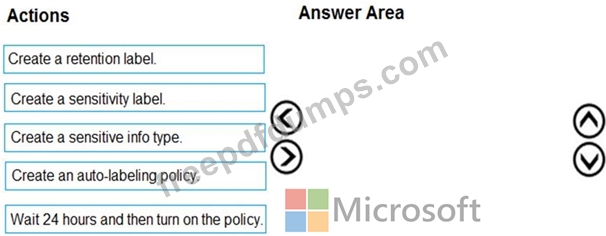
You need to meet the technical requirements for the Site1 documents.
Which three actions should you perform in sequence? To answer, move the appropriate actions from the list of actions to the answer area and arrange them in the correct order.
Overview
Contoso, Ltd. is a consulting company that has a main office in Montreal and three branch offices in Seattle, Boston, and Johannesburg.
Existing Environment
Microsoft 365 Environment
Contoso has a Microsoft 365 E5 tenant. The tenant contains the administrative user accounts shown in the following table.
Users store data in the following locations:
SharePoint sites
OneDrive accounts
Exchange email
Exchange public folders
Teams chats
Teams channel messages
When users in the research department create documents, they must add a 10-digit project code to each document. Project codes that start with the digits 999 are confidential.
SharePoint Online Environment
Contoso has four Microsoft SharePoint Online sites named Site1, Site2, Site3, and Site4.
Site2 contains the files shown in the following table.
Two users named User1 and User2 are assigned roles for Site2 as shown in the following table.
Site3 stores documents related to the company's projects. The documents are organized in a folder hierarchy based on the project.
Site4 has the following two retention policies applied:
Name: Site4RetentionPolicy1
- Locations to apply the policy: Site4
- Delete items older than: 2 years
- Delete content based on: When items were created
Name: Site4RetentionPolicy2
- Locations to apply the policy: Site4
- Retain items for a specific period: 4 years
- Start the retention period based on: When items were created
- At the end of the retention period: Do nothing
Problem Statements
Management at Contoso is concerned about data leaks. On several occasions, confidential research department documents were leaked.
Requirements
Planned Changes
Contoso plans to create the following data loss prevention (DLP) policy:
Name: DLPpolicy1
Locations to apply the policy: Site2
Conditions:
- Content contains any of these sensitive info types: SWIFT Code
- Instance count: 2 to any
Actions: Restrict access to the content
Technical Requirements
Contoso must meet the following technical requirements:
All administrative users must be able to review DLP reports.
Whenever possible, the principle of least privilege must be used.
For all users, all Microsoft 365 data must be retained for at least one year.
Confidential documents must be detected and protected by using Microsoft 365.
Site1 documents that include credit card numbers must be labeled automatically.
All administrative users must be able to create Microsoft 365 sensitivity labels.
After a project is complete, the documents in Site3 that relate to the project must be retained for
10 years.
Drag and Drop Question
You need to meet the technical requirements for the Site1 documents.
Which three actions should you perform in sequence? To answer, move the appropriate actions from the list of actions to the answer area and arrange them in the correct order.
SC-400 Exam Question 40
Drag and Drop Question
You have a Microsoft 365 E5 subscription.
You need to label Microsoft Exchange Online emails that match the following conditions:
- Contain employment offers
- Contain offensive language
- Contain medical terms and conditions
The solution must minimize administrative effort.
Which type of data classification should you use for each condition? To answer, drag the appropriate data classification types to the correct conditions. Each data classification type may be used once, more than once, or not at all. You may need to drag the split bar between panes or scroll to view content.
NOTE: Each correct selection is worth one point.

You have a Microsoft 365 E5 subscription.
You need to label Microsoft Exchange Online emails that match the following conditions:
- Contain employment offers
- Contain offensive language
- Contain medical terms and conditions
The solution must minimize administrative effort.
Which type of data classification should you use for each condition? To answer, drag the appropriate data classification types to the correct conditions. Each data classification type may be used once, more than once, or not at all. You may need to drag the split bar between panes or scroll to view content.
NOTE: Each correct selection is worth one point.
