Youare configuring an HPE Aruba NetworkingGateway Ouster with AOS-10. What is true about 802.1 X functionality incombination with gateways? (Select two.)
Correct Answer: B,D
This question asks about 802.1X functionality in an AOS-10 environment involving Gateway Clusters. * AOS-10 Gateway/802.1X Architecture: * Authenticator:The Access Point (AP) typically acts as the 802.1X authenticator, handling EAPoL frames with the client. * RADIUS Proxy:The Gateway Cluster (specifically the cluster leader or UDG anchor) often acts as a RADIUS proxy, forwarding RADIUS messages between the APs and the central RADIUS server (e.g., ClearPass). This simplifies RADIUS configuration as the server only needs to know about the gateway cluster. * CoA:Change of Authorization messages from the RADIUS server are typically sent to the device acting as the RADIUS client, which is the Gateway Cluster when operating in proxy mode. * Mobility (L2 vs L3):Roaming behavior and User Designated Gateway (UDG) assignment can differ based on whether clients maintain their IP address (L2 mobility) or potentially require new IP information (L3 mobility). L2-connected gateway deployments generally allow for more seamless UDG persistence compared to L3-connected deployments where the client might roam across subnet boundaries managed by different gateways. * Re-authentication:Seamless roaming mechanisms aim to minimize full re-authentications during roaming events. * Analysis of Options: * A: Full re-authentication after re-association on L3-connected gateways might occur in some scenarios but contradicts the goal of seamless roaming. * B: States the UDG remains fixed on L2-connected but not on L3-connected gateways. This aligns with the architectural differences in handling mobility across L2 vs L3 boundaries within a cluster. * C: Incorrect. CoA is generally sent to the RADIUS client/proxy (the Gateway Cluster), not always directly to the APs. * D: Correct. Gateways commonly act as a RADIUS proxy, while the AP remains the authenticator handling EAPoL with the client. * E: Incorrect. The RADIUS proxy function is not limited to only Tunnel and Bridged modes. * Conclusion:Options B and D accurately describe common characteristics of 802.1X operation within an AOS-10 Gateway Cluster architecture. References:Aruba AOS-10 documentation (Gateway Clusters, User-Based Tunneling, 802.1X/RADIUS interaction, L2/L3 Mobility). This relates to "Authentication/Authorization" (9%), "Connectivity" (9%), and "WLAN" (9%) objectives.
HPE7-A06 Exam Question 12
You are configuring VSX active gateway on CX 8360 campus aggregation switches when the switch prompt returns the following error: "No more than IB VMACs can be configured." What should be done to address this issue?
Correct Answer: D
The error "No more than 16 vMACs can be configured" occurs when trying to configure active-gateway on multiple SVIs on a CX 8360 VSX pair. This indicates a platform limit on the number of unique virtual MAC addresses has been reached. * Active Gateway vMACs:Each SVI configured with Active Gateway requires a virtual MAC address (vMAC). While AOS-CX can auto-generate these, doing so consumes entries from a limited hardware pool (e.g., 16 on this platform/version). * Best Practice & Solution:The recommended best practice to conserve these limited vMAC resources is to manually specify andreuse the same virtual MAC addressacross all SVIs configured with Active Gateway on that specific VSX pair. Since MAC addresses are Layer 2 local, using the same vMAC on different SVIs (different L3 subnets) does not cause conflicts within the VSX pair's operation. * Analysis of Options: * A: Limiting the number of SVIs using Active Gateway is a workaround, not a solution. * B: Changing switch profiles doesn't typically alter hardware vMAC limits. * C: Changing to a higher-end switch model might increase limits but is not the first or standard solution. * D: Reusing the same VMAC across SVIs (active-gateway ip <vip> mac <SAME_VMAC>) avoids consuming a new vMAC entry for each SVI, thus staying within the platform limit. This is the standard, recommended solution. * Conclusion:The correct approach to address the vMAC limit error is to explicitly configure the same virtual MAC address for all SVIs using the Active Gateway feature on the VSX pair. References:AOS-CX VSX Guide (Active Gateway Configuration, Best Practices, vMAC considerations). This relates to "Network Resiliency and virtualization" (8%) and "Routing" (16%).
HPE7-A06 Exam Question 13
A client would like to usetheHPE Aruba Networking Switch MultiEdit Software function in HPE Aruba Networking Central. Which option is available?
Correct Answer: D
The question involves a client wanting to use the HPE Aruba Networking Switch Multi-Edit Software function in HPE Aruba Networking Central to manage multiple switches. The task is to identify the available option. * Analysis of Options: * Option A (Use templates and apply them to selected switches):Incorrect. Templates are used for configuration management in Central but are not part of the Multi-Edit Software function. * Option B (Apply a configuration to an interface range for selected switches):Incorrect. Multi- Edit focuses on CLI scripting, not specifically interface range configurations. * Option C (Run the same NAE scripts for selected switches):Incorrect. Network Analytics Engine (NAE) scripts are for monitoring, not configuration via Multi-Edit. * Option D:Correct. Multi-Edit Software in Central allows administrators to apply CLI scripts to multiple selected switches for configuration changes. * Why Option D is Correct:HPE Aruba Networking Central's Multi-Edit Software feature enables administrators to create and apply CLI scripts to multiple AOS-CX switches simultaneously, streamlining configuration tasks. This is particularly useful for bulk changes, such as VLAN configurations or policy updates, across selected switches. The feature supports direct CLI input or script uploads, ensuring consistent application of commands, as per HPE Aruba Networking's management tools. This aligns with the client's need for efficient multi-switch management. * Relevance to Certification Objectives: * Connectivity (9%):Developing configurations for multiple devices based on customer requirements. * Troubleshooting (10%):Applying consistent configurations to resolve network issues. * Network Stack (4%):Analyzing solutions for network management automation. References: HPE Aruba Networking Central User Guide: Multi-Edit Software Feature, detailing CLI script application. HPE7-A06Study Guide: Covers network management tools in Central. HPE Aruba Networking Technical Documentation: Multi-Edit Software Best Practices.
HPE7-A06 Exam Question 14
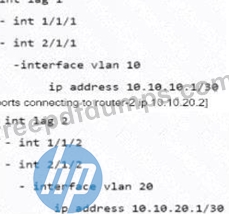
A customer has configured eBGP peering using local AS 65000 with two routers from a CX 6300 VSF stack with thefollowing switch ports: [ports connecting to router-1 10.10.10.2] The LAGs are connected lo third-party L2 switches, which are used as a transit network for the remote eBGP routers. To optimise the possible BGP peering issues. The AOS-CX switch Is configured with theglobal settings: What needs to be done on the AOS_CX switch to enable the bidirectional forwarding with the eBGP peers?
Correct Answer: B
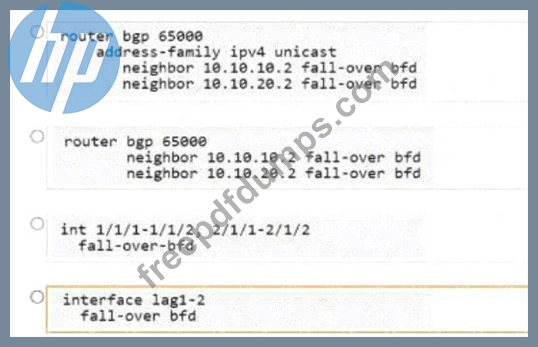
The goal is to enable Bidirectional Forwarding Detection (BFD) for eBGP neighbors 10.10.10.2 and 10.10.20.2 on the AOS-CX VSF stack (AS 65000). Global BFD settings are already configured. We need the specific commands to link BFD state to the BGP neighbor relationship. * BFD for BGP Configuration:Requires enabling the fall-over bfd parameter for the specific neighbor within the router bgp <asn> configuration hierarchy. * Analyzing the Options (New Image): * Option 1 (Top): router bgp 65000 address-family ipv4 unicast neighbor 10.10.10.2 fall-over bfd neighbor 10.10.20.2 fall-over bfd This enables BFD specifically within the ipv4 unicast address family context for both neighbors. This is a valid configuration location. * Option 2 (Second): router bgp 65000 neighbor 10.10.10.2 fall-over bfd neighbor 10.10.20.2 fall-over bfd This enables BFD directly under the main neighbor <ip> configuration lines within router bgp 65000. This typically applies BFD to all address families configured for that neighbor relationship (including IPv4 unicast). This is also a valid and common configuration location. * Option 3 (Third): int 1/1/1-1/1/2, 2/1/1-2/1/2 fall-over-bfd Incorrect. Applies BFD configuration under an interface range context, which is not how BFD is linked to BGP sessions. * Option 4 (Bottom): interface lag1-2 fall-over bfd Incorrect. Applies BFD configuration under an interface LAG range context, which is not how BFD is linked to BGP sessions. * Comparing Valid Options (1 vs 2):Both Option 1 and Option 2 correctly use the fall-over bfd command under router bgp. Option 1 provides per-address-family granularity, while Option 2 applies it to the neighbor generally. Without a specific requirement to enable BFDonlyfor IPv4, applying it at the neighbor level (Option 2) is often simpler and sufficient. Both achieve the goal for the required IPv4 peering. In many documentation examples, the configuration is shown at the neighbor level unless per- AF control is explicitly needed. * Conclusion:Both Option 1 and Option 2 show valid configuration methods. Option 2 is arguably slightly more common/general when BFD is desired for the overall neighbor relationship. References:AOS-CX BFD Guide, AOS-CX BGP Guide (neighbor commands, fall-over bfd option). This relates to "Routing" (16%) and "Network Resiliency and virtualization" (8%) objectives.
HPE7-A06 Exam Question 15
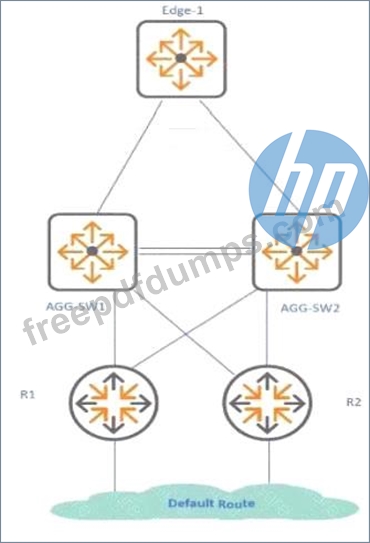
Exhibit. In the given example AGG-SW1 and AGG-SW2 use CX 8325 in VSX and Edge-1 withCX 6200F. You want toavcwl sub-optimal path.ng and ISL traffic for the VSX and upstream routers R1 and R2. What is the HPE Aruba Networkingrecommended solution for me SVIs on the VSX switches connected to R1 and R2?
Correct Answer: A
The scenario involves a VSX pair (AGG-SW1/SW2) connected upstream to routers R1/R2. The goal is to configure the SVIs on the VSX switches facing these upstream routers optimally to avoid suboptimal L3 paths and unnecessary traffic over the VSX Inter-Switch Link (ISL). * VSX L3 Interface Options: * Active Gateway:Primarily designed for downstream SVIs to provide a redundant default gateway to clients/access switches. Not typically used for upstream routed interfaces. * Active Forwarding:Specifically designed for upstream routed interfaces (physical or SVIs) on a VSX pair. It allows both VSX members to actively route traffic arriving on that interface locally, without needing to forward L3 traffic across the ISL. This ensures optimal routing and utilizes both members effectively. * Unicast IP (Standard IP):Without specific VSX features, standard routing applies. This could lead to suboptimal paths if, for example, return traffic prefers one VSX switch, but the optimal path requires crossing the ISL. * VRRP:Can be run between VSX members but adds complexity and is generally superseded by Active Gateway (downstream) or Active Forwarding (upstream) in VSX designs. * Analysis of Options: * A. Configure active-forwarding: This enables local L3 forwarding on both VSX members for the upstream SVI, preventing unnecessary ISL traversal for routed traffic. This is the recommended best practice. * B. Configure unicast IP: Standard configuration, potentially leading to suboptimal paths/ISL usage. * C. Configure VRRP virtual-ip: Not the recommended approach for upstream links in VSX. * D. Configure active-gateway: Incorrect, Active Gateway is for downstream SVIs. * Conclusion:Using active-forwarding on the SVIs facing the upstream routers (R1/R2) is the HPE Aruba Networking recommended solution to ensure optimal routing and minimize L3 traffic across the ISL. References:AOS-CX VSX Guide (Active Forwarding feature description and use cases). This relates to "Network Resiliency and virtualization" (8%) and "Routing" (16%) objectives.